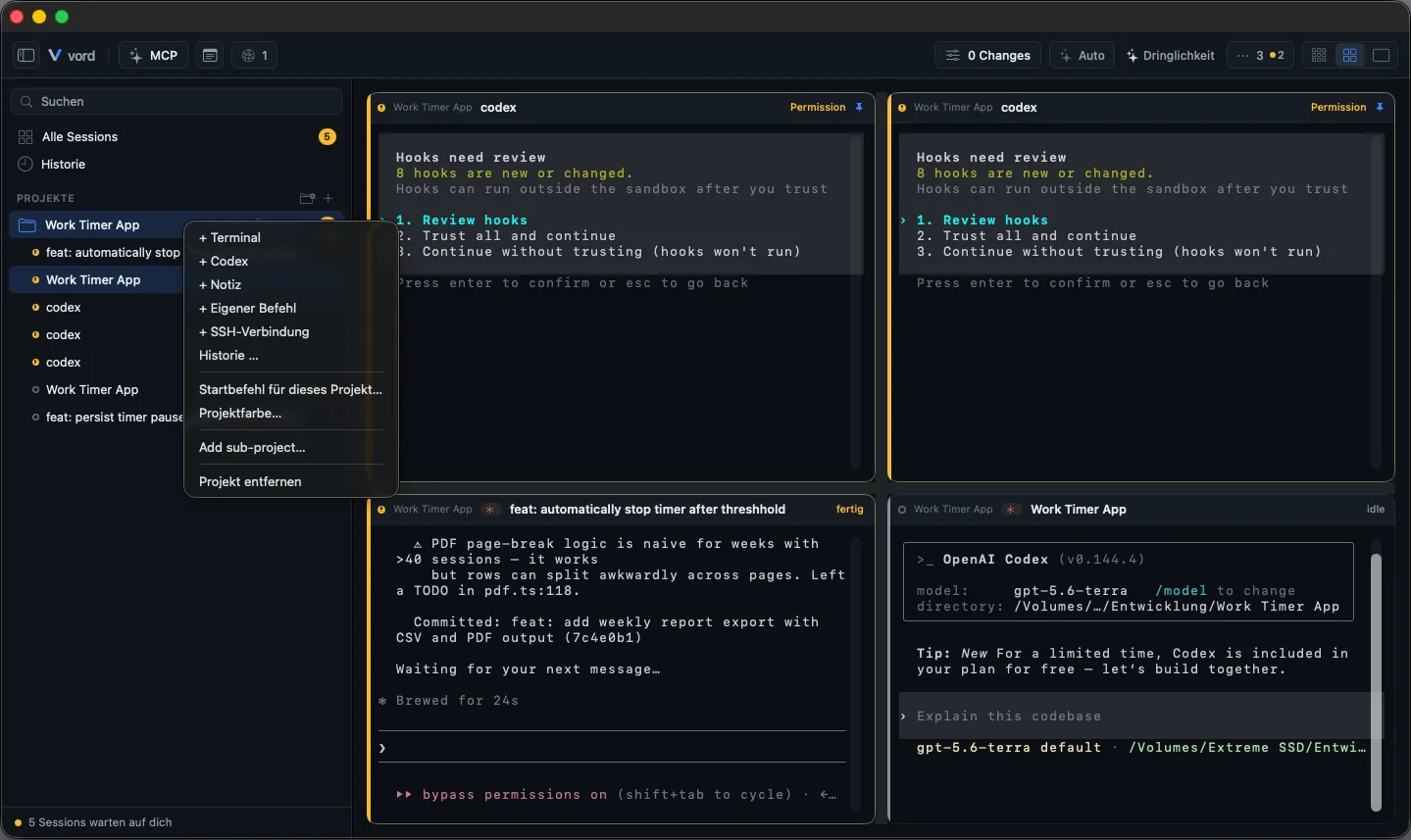
Starting Sessions
A session is one running unit of work inside a project — a claude, codex, kimi, Grok, OpenCode or Muse agent, a bare shell, or an SSH connection. All eight show up as an equal tile in the cockpit with the same status detection.
The eight kinds
Section titled “The eight kinds”| Kind | What it is |
|---|---|
| claude | A real claude Code process. vord injects --session-id and its own --settings file so hooks report status back to vord. |
| codex | A real codex process, started from its absolute binary path with --config notify=… and vord’s MCP overrides wired in. |
| kimi | A real kimi (Kimi Code CLI) process. vord reports status through a managed hook block in kimi’s own global config.toml and wires its MCP server in through the project-local .kimi-code/mcp.json. |
| grok | A real Grok Build TUI process (grok). vord starts it with --session-id and --no-alt-screen, reports status through ~/.grok/hooks/vord-status.json, and wires its MCP server in through the project-local .grok/config.toml. |
| opencode | A real OpenCode process. Install it separately and sign in with opencode auth login; vord reads the models that installation currently reports. |
| muse | A real Muse Code process (muse). Install Muse Code from Meta, sign in once with muse login or META_API_KEY, and vord finds it automatically. Status comes from Muse’s hooks. |
| Terminal (shell) | A plain login shell (zsh -l). You type claude, codex, kimi, grok, muse, npm, git, or anything else yourself. |
| SSH | A connection to a remote host — either a saved connection or a ~/.ssh/config alias. The local working directory stays your project folder; only the shell runs remotely. |
Starting one
Section titled “Starting one”There’s no single “+ menu” listing all six side by side. Instead:
- claude — start a Terminal session (see below), then type
claude, or set a per-project startup command override so it launches automatically. - codex — right-click a project in the sidebar → + Codex. This is a native one-click spawn: vord starts the real codex binary directly, no typing required.
- kimi — right-click a project in the sidebar → + Kimi. Same native one-click spawn for the real kimi binary.
- grok — right-click a project in the sidebar → + Grok. Same native one-click spawn for the real
grokbinary (~/.grok/bin/grok). Greyed out if Grok is not installed. - opencode — right-click a project in the sidebar → + OpenCode. The option is available only when vord finds the OpenCode CLI on that Mac.
- muse — right-click a project in the sidebar → + Muse. Same native one-click spawn for the real
musebinary (typically~/.local/bin/muse). Greyed out if Muse is not installed. - Terminal — click the + icon at the right edge of a project row, or right-click a project → + Terminal.
- SSH — right-click a project → + SSH connection to create one, or pick an existing saved connection from the SSH pool (see SSH).
New sessions land in whichever project you right-clicked or hit + on; they don’t switch your current sidebar filter.
Folder trust
Section titled “Folder trust”When claude asks whether you trust a new folder, its choices appear as an answer box in the chat view in both Code and Cowork modes and on the iPhone. The session waits for your answer before it can start; review the folder before choosing. Other agents may still require an answer in the terminal.
Code and Cowork modes
Section titled “Code and Cowork modes”Choose Code mode or Cowork mode from the Work mode switch in the toolbar, the Work mode menu, or the command palette. vord remembers this choice for the whole app. The Cowork view uses the normal vord design; the choice does not require a separate Cowork entitlement.
The Cowork view hides branch, sync, and commit controls; the Code view shows them as before.
⌘T: new session in context
Section titled “⌘T: new session in context”⌘T starts a new Terminal session in the “right” project — it follows the currently selected session’s project, or the sidebar scope you have focused. If neither is clear (nothing selected, no scope), vord does nothing rather than guessing the first project in the list; you get a system beep, not a session in the wrong folder.
⌘T is rebindable in the keyboard shortcut settings (action “New session”).
Start a session in its own worktree
Section titled “Start a session in its own worktree”Session → New session in own worktree starts a Terminal in a fresh git worktree of the active project. vord places it at <parent folder>/<repo>-worktrees/<name> on branch vord/<name>, based on the current commit.
If the repository has an executable .vord/prepare (or .agents/prepare), vord runs it first — only after you confirm it in the sheet. vord remembers the script hash per project; a change to the script asks again. .vord/linked (or .agents/linked) links git-ignored files such as .env from the main checkout into the worktree.
While it prepares, the sheet shows Preparing the worktree …. You can Continue in background. If the script is not trusted yet, the sheet asks you to trust it. On a prepare error you can Discard worktree or Start anyway.
This menu item is not available in Cowork mode.
What vord injects for claude/codex/kimi/opencode/grok/muse
Section titled “What vord injects for claude/codex/kimi/opencode/grok/muse”Starting an agent session isn’t just running the binary — vord wires in the machinery that makes status detection, subagent tracking, and the rest of the app work:
- claude: a generated session UUID passed as
--session-id, plus a temporary--settingsfile pointing hooks (SessionStart,Stop,UserPromptSubmit, subagent hooks) at vord’s local hook listener. AnX-Vord-Sessionheader lets vord match hook payloads to the right tile even with multiple claude processes in the same folder. - codex:
--config notify=…pointing at vord’s notify script, and vord’s own MCP server config merged in. - kimi: kimi has no per-project hook mechanism, so vord keeps a managed, clearly marked hook block in kimi’s global
~/.kimi-code/config.toml(installed on the first kimi start, removed when vord quits, everything else in the file untouched) — the block reports the same events over the same local channel. Its MCP wiring goes into the project-local.kimi-code/mcp.jsoninstead. - opencode: OpenCode’s session configuration is isolated from your global configuration and carries vord’s event and MCP integration. Its provider model list remains dynamic: it is read from the installed, signed-in OpenCode instead of being a vord catalog.
- grok:
--session-idplus--no-alt-screenso the tile’s visible buffer stays readable. Hooks are native command files in$GROK_HOME/hooks/vord-status.json(always trusted); the script POSTs to$VORD_HOOK_URL. Grok rejects HTTP hooks that are nothttps://, so vord disables Claude-compat hooks (GROK_CLAUDE_HOOKS_ENABLED=false) instead of reusing.claude/settings.local.json. Project MCP is a merged[mcp_servers.vord]block in.grok/config.toml(git-excluded). Resume isgrok --resume <id>. - muse: vord starts the real
musebinary. Status comes from Muse’s hooks. User MCP is written to~/.config/muse/settings.json(stdio and streamable HTTP; SSE is not copied). Project MCP is the shared.mcp.json. Resume ismuse resume <id>. - All six: the
vord-mcpserver (forshow_to_userandsend_to_mesh), and the automatic peer-awareness context injection that rides the hook return channel — see that page for how claude and codex differ on when it reaches the agent.
Which MCP servers a new session actually gets depends on its role and on the project’s MCP profile — see MCP servers per session.
A shell or SSH session gets none of this automatically; it only picks up status via output heuristics unless you type claude/codex/kimi/grok/muse yourself, in which case detection kicks in once the app announces itself in the output.
The auto-startup command for shells
Section titled “The auto-startup command for shells”A Terminal session can auto-type a command the moment its shell is ready — global (all projects) or overridden per project.
- Global default: set in Settings (the startup command that every new Terminal types, e.g.
claude). - Per-project override: right-click a project → Startup command for this project… → type a command, or leave it blank to fall back to the global default. See per-project startup command.
- Suppressing it once: Shift-click the + button to get a bare shell instead.
The license gate on every start
Section titled “The license gate on every start”Every spawn path — claude, codex, kimi, grok, opencode, muse, Terminal, SSH, and Resume — checks the same license gate that guards the app itself. Normally you never see it fire: an expired trial locks the whole window back to the sign-in screen before any spawn button is reachable. If a spawn is denied anyway (for example from the menu-bar extra or a remote request while signed out), vord shows the reason — “Sign in with your vord account to start sessions.” — instead of silently doing nothing. See Account, License & Trial.
Codex specifics
Section titled “Codex specifics”- Native session name. Codex creates a content-based name after the first task and stores it in
session_index.jsonl. vord follows this name and later renames. Until then, a preview of the first prompt can appear. A name set manually in vord stays visible. On resume, the stored name is kept even when an older session still carries a prompt name. - Project configuration. The local MCP connection needs a writable project folder. The user directory itself and links to global Codex configurations are excluded for this.
- Greyed out if not installed. The + Codex menu item is disabled with a tooltip (“Codex is not installed on this Mac”) if vord can’t find a
codexbinary on your system. You bring your own CLI — vord doesn’t install or bundle either agent. - Safe CLI updates. vord updates Codex only when it can prove that the existing CLI comes from the official installer path or the active npm-global Homebrew link; Homebrew, Cask, and unknown installations stay externally managed. It never creates a second installation and waits until every Codex session it hosts has ended before replacing files. Isolated dev and test instances never update the user’s CLI.
- No approval channel like claude. codex has no interactive MCP-based permission dialog; vord reads its status purely from notify events and rollout files.
Kimi specifics
Section titled “Kimi specifics”- Hooks live in kimi’s global config. kimi has no per-project hook config, so vord installs a clearly marked block in
~/.kimi-code/config.tomlon the first kimi start and removes it again when vord quits. Every write is backed up and validated before it sticks; everything outside vord’s block stays byte-identical. No codex-style trust step — hooks fire from the first session. - Kimi provides no OSC title. vord takes Kimi’s session title from the stored session state; this usually corresponds to the first prompt.
- Greyed out if not installed. + Kimi is disabled with a tooltip (“Kimi is not installed on this Mac”) if vord can’t find a
kimibinary. - A typed
kimiworks too. Start kimi by hand in a plain Terminal and vord recognizes it from its output (the moon-phase spinner, its permission/plan/question boxes) — status detection just runs on the heuristic path instead of hooks. - Usage limits without a stated reset. A kimi session that hits its 5-hour window or its billing-cycle quota shows ⏳. When quota data provides a reset time, vord shows it; otherwise the reset is unknown. Auto-Continue does not apply to Kimi, so you continue the session yourself after the limit — see Usage Limits & Auto-Continue.
OpenCode specifics
Section titled “OpenCode specifics”- Install and sign in separately. vord does not bundle OpenCode: install its CLI, then run
opencode auth loginbefore starting a session. - OpenCode 1 and 2. vord reads the installed version (
opencode --version) and uses the matching integration. OpenCode 3 or newer is not supported yet: the session does not start and vord shows a message — see Unsupported OpenCode version. - OpenCode 2 keeps vord’s sessions separate. With OpenCode 2, vord starts a private local OpenCode server for each session and stores these sessions in
vord.dbin OpenCode’s data folder (~/.local/share/opencode/by default, or the data folder of the account the session uses). OpenCode started outside vord uses its own database, so it does not list sessions you ran in vord, and OpenCode’s background service never picks them up. Resume such a session in vord. - Typing
opencodein a vord terminal. With OpenCode 2, vord starts a private server in the background, connects the OpenCode interface to it once vord’s tools and password protection are ready, and stops the server when you quit OpenCode. Subcommands such asopencode auth,opencode models,opencode upgrade,opencode runandopencode serve, your ownOPENCODE_CONFIG, and the options--serverand--standalonerun unchanged, without vord’s integration. - Models are provider-supplied. The available list can change as your OpenCode providers change. There is no OpenCode thinking-depth setting in vord; choose the model instead.
- Four permission presets. OpenCode sessions use Read only, Ask (the default), Edits allowed, and Auto. They express the amount of access OpenCode receives, not a thinking level.
- Provider-reported limits stay honest. OpenCode reports an exhausted quota as a typed session error, so vord shows the limit. A return time appears only when the provider supplies one; without it, vord says that the time is unknown and never estimates. Auto-continue runs only with that reliable time or when the provider explicitly permits a retry. Otherwise the session waits for you. An expired OpenCode sign-in is reported as an authentication problem, not a quota problem; run
opencode auth loginto reconnect. - A full context window is a readable error, never a retry. When the model’s context window overflows, vord ends the turn without retrying or auto-continuing and tells you to use a model with a larger context or let OpenCode compact. An error type vord does not know is shown with its name and the provider’s text (truncated and redacted), instead of a generic message. The same error from the same session notifies only once within two minutes — on the Mac and on the phone.
Muse specifics
Section titled “Muse specifics”- Install and sign in separately. vord does not bundle Muse: install Muse Code from Meta (
muse, typically~/.local/bin/muse), then runmuse loginonce (Meta account, browser code) or setMETA_API_KEY. vord finds Muse automatically. There is exactly one Muse account. - Greyed out if not installed. + Muse is disabled if vord can’t find a
musebinary. - A typed
museworks too. Start Muse by hand in a plain Terminal and vord recognizes it from its hooks once the session is running. - Trust the folder. The first start in a new folder shows Muse’s own trust question as a 🟡 box. Child sessions that vord starts trust the folder for that run only.
- Four permission levels. Muse sessions use Read-only, Ask me, Auto-review, and Unrestricted. Muse has no plan mode; Read-only is the closest counterpart. Change the level in the TUI with
/permissions. - Unrestricted means no prompts. vord starts Unrestricted Muse sessions without approvals and without Muse’s sandbox, like Claude’s bypass mode and Codex Full Access. Muse then no longer asks before each new network destination. Muse’s footer shows Launch overrides for this start.
- Network prompts turn the tile yellow. In Ask me and Auto-review, Muse asks before a new network destination (“Would you like to allow this network access?”). The tile shows 🟡 while that box is open, even when other tool calls keep running.
- Follow-ups wait for the turn. A message sent while Muse is working is queued and appears after the turn.
- Models come from Muse. The catalog is loaded live (names such as
muse-wonder-1.0ormuse-spark-1.3-contributorare examples; thinking levels run from minimal to max, depending on the model). vord does not keep a fixed Muse model list.