Status: The Traffic Lights
Every session in vord carries one of five status colors. Learn to read them and you’ve learned the app — everything else (notifications, auto-pilot, the urgency that orders the cockpit tiles) is built on top of this one signal.
Green, amber, grey, red, hourglass — what each means
Section titled “Green, amber, grey, red, hourglass — what each means”| Dot | Meaning | What triggered it |
|---|---|---|
| 🟢 Green | The agent is actively working | A tool call, a turn in progress, streaming output |
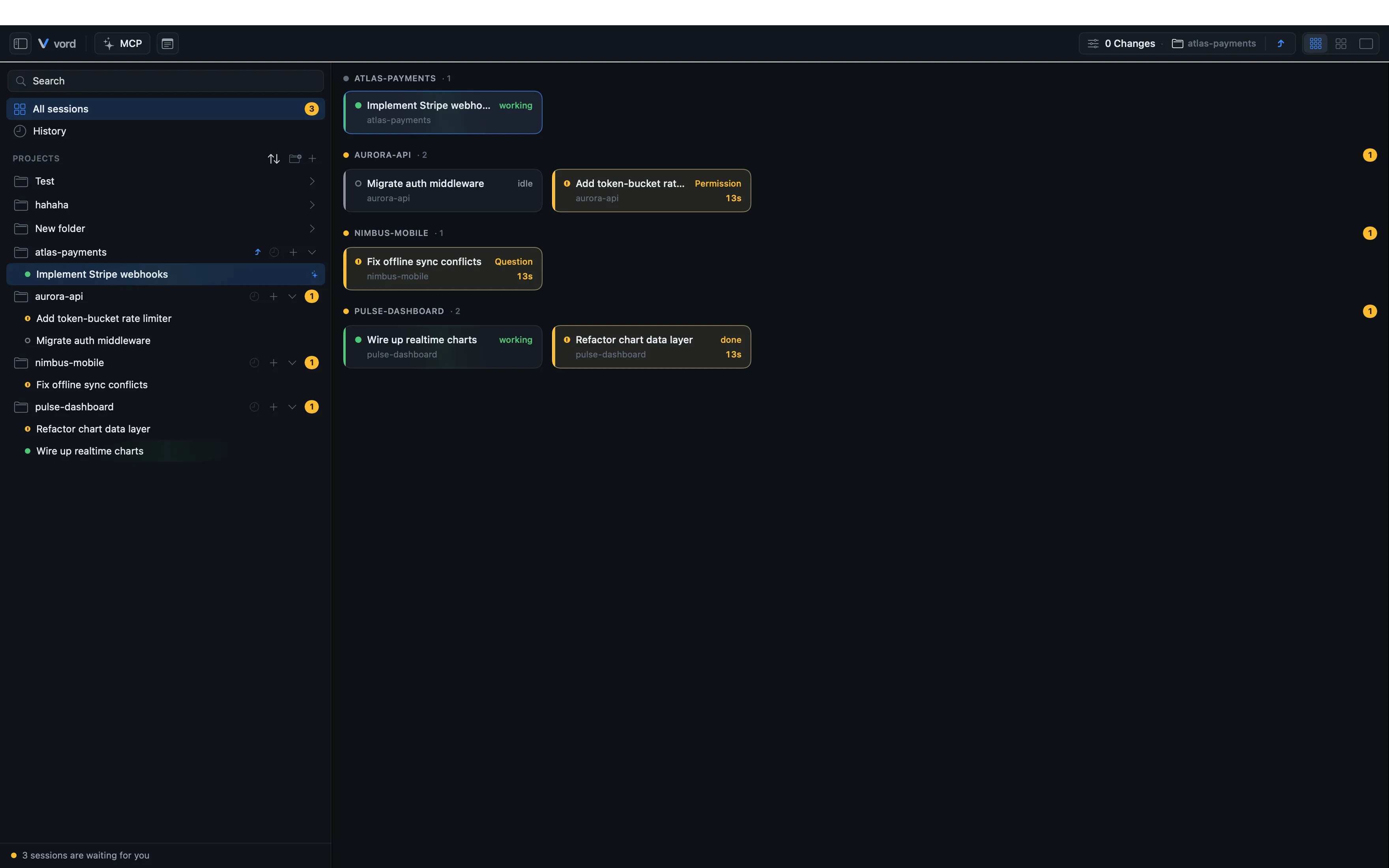
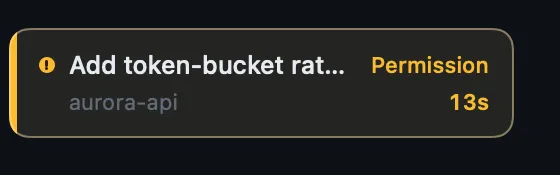
| 🟡 Amber | The agent is waiting on you | A permission request, a question, a plan to approve, or “I’m done, what’s next?” |
| ⚪️ Grey | Idle | No activity for a while after finishing, with nothing waiting on you |
| 🔴 Red | The agent process ended with an error | An unexpected crash or non-zero exit — not a session you closed yourself |
| ⏳ Hourglass | Usage limit hit | A limit message on screen or in the agent’s own records — a session/weekly cap, a spend cap, or a per-model cap (“You’ve reached your <model> limit”) — with a countdown when the reset time is stated or backed by the account’s quota data. It holds until the agent provably works again, the announced reset time passes, or a fresh official quota reading measured after the limit shows free capacity |
Amber is the one that matters most day to day — it’s the moment vord is telling you the session needs a human. See Responding to a Waiting Session for how to answer it.
The grey idle state kicks in 180 seconds after a session finishes with nothing waiting on you — it’s a fixed internal threshold, not a setting.
Red: the agent crashed, you didn’t end it
Section titled “Red: the agent crashed, you didn’t end it”A session goes 🔴 red when its underlying claude/codex process terminates on its own with a non-zero exit code — a crash, an uncaught error, anything that isn’t a clean exit. It’s a distinct case from just “the session ended”: vord tracks why the process went away, not only that it did.
The distinction that matters: ending a session yourself never turns it red. Closing a tile, quitting vord, or any other vord-initiated shutdown is a clean, expected termination — that session shows the normal ended/grey treatment, not red. Red is reserved for the process dying on its own, unrequested.
Because a crash is more likely to need your attention than a session you deliberately closed, red sessions rank as active and visible — same tier as amber/green, not folded away with the quiet ended sessions — and their urgency keeps them ahead of the quiet ones on the Project, Agent, and Status axes. See The Pool & Sorting for the full sort-axis picture.
Where the status dot shows up
Section titled “Where the status dot shows up”The same colored dot appears everywhere a session is represented:
- The sidebar row
- The cockpit tile header and the tile’s status word
- The gallery strip in Focus mode
- The on-demand pool chips
- The branch row (aggregated across its sessions)
An amber tile also shows a live “waiting Xs” timer next to the dot, and an hourglass tile shows a countdown like “⏳ in 1h 45m (20:50)” instead of the usual timer.
How detection works: hooks first, output heuristic as fallback
Section titled “How detection works: hooks first, output heuristic as fallback”vord doesn’t guess status by staring at pixels as a first resort. It has two detection paths, and one always wins over the other:
- Hooks (primary). When vord starts a claude, codex, or kimi session itself (the project row’s “+” button, the “+ Codex” / “+ Kimi” menu entries, or
⌘T), it wires in hooks —UserPromptSubmit,PreToolUse,PostToolUse,Stop,PermissionRequest,Notification,SessionEnd,SubagentStart,SubagentStop. These fire structured events straight from the CLI, so vord knows exactly what happened without reading a single character of terminal output. kimi has no per-project hook config, so vord keeps a managed hook block in kimi’s global~/.kimi-code/config.toml(removed again when vord quits) — no trust step, hooks fire from the first kimi session. - Output heuristic (fallback). If a session wasn’t started through vord’s hook path — a plain
claude,codex, orkimityped into a bare shell — vord falls back to reading the visible terminal content: spinner frames (kimi’s is a moon-phase cycle), selection/permission box shapes, interrupt footers.
A hook-reported event always takes precedence over the heuristic. If both are available, the hook wins.
The heuristic only ever looks at what is currently on screen. It deliberately does not read back through the raw output stream, because a dialog you already answered — a /model picker, say — stays in that stream long after the screen has moved on, and reading it there would report a box that no longer exists.
Position on screen matters too: a live box is always the bottommost thing an agent shows — nothing of its own renders below it. If the visible screen shows a permission/plan/question box shape followed further down by genuine new work (an interrupt footer or a spinner), vord treats the box as leftover scrollback (for example, the agent printed a captured screenshot of an old box while explaining something) rather than something actually waiting on you, and reads the session as working instead.
A guessed amber corrects itself
Section titled “A guessed amber corrects itself”An amber that came from a hook is a fact: vord holds it until the agent itself reports otherwise, and no screen reading can clear it. An amber that the heuristic guessed from the screen is treated differently — it clears again as soon as the screen no longer shows the box, either because the session visibly moved on, or because the screen has simply stood still with nothing waiting on it. So a misread never leaves a session stuck on amber; at worst it costs a moment.
Why hooks are more reliable (and what a “vord-wrapped” session is)
Section titled “Why hooks are more reliable (and what a “vord-wrapped” session is)”A session started via vord’s own spawn menu is “vord-wrapped”: it carries the hook wiring, the session ID, and the MCP server injection from the moment it starts (see Starting Sessions). A session you type into a bare shell yourself never gets that wiring — it runs on the output heuristic for its entire life, which is strictly less precise than hook events.
The spoofing limit
Section titled “The spoofing limit”Being honest about a limitation: the output heuristic reads unprotected terminal text. In principle, an agent’s own output could echo a string that looks like a box signature and confuse the heuristic into reporting the wrong status. This is a known, documented limit — not something code can fully close, because the heuristic’s whole job is interpreting arbitrary text. It’s also exactly why hook-based detection always has priority: a hook value can’t be spoofed the same way, since it comes from a structured event the CLI itself emits.
Live indicators: wait timer, working shimmer
Section titled “Live indicators: wait timer, working shimmer”A working (🟢) tile shows a subtle, slightly diagonal light strip animating across it — the “working shimmer.” It’s purely decorative, not an extra status signal, and it turns itself off automatically under macOS Reduce Motion. You can adjust its intensity (Off / Soft / Medium / Strong) under Settings → Workspace → Cockpit & Tiles → Strength of the working shimmer.
A waiting (🟡) tile shows a live “waiting Xs/Xm” timer next to the status word so you can see at a glance how long a session has been stuck.
Codex differences
Section titled “Codex differences”codex and claude share the same status model, but codex has a few structural gaps worth knowing up front (the full comparison lives on Claude vs. Codex vs. Kimi):
-
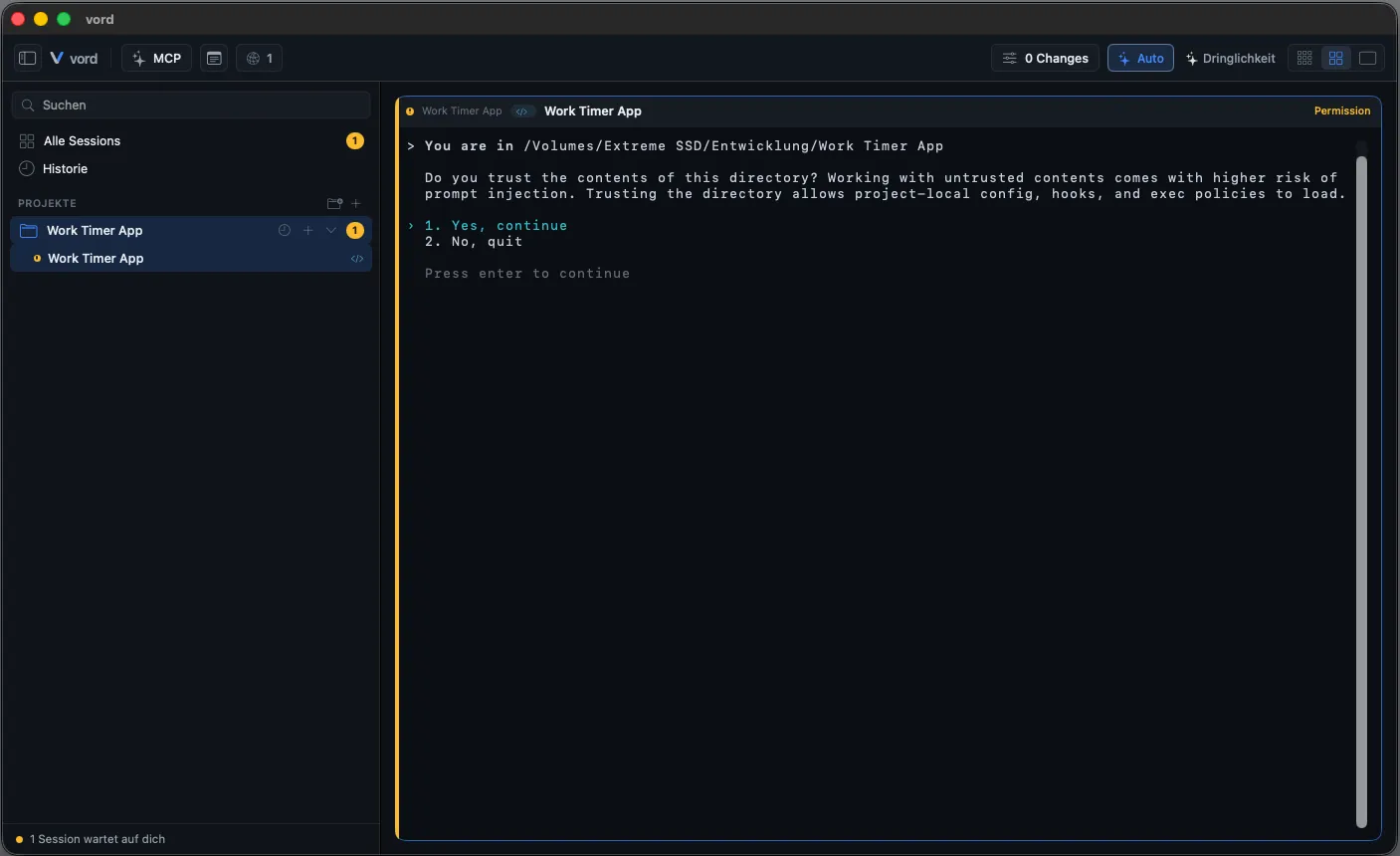
Trust hurdle. codex hooks only fire after you confirm “Trust all and continue” once in the codex terminal itself. Until then, status relies on a less precise, trust-free notify channel, and the protection against a false “finished”/“idle” flip doesn’t fully apply. vord shows a one-time amber banner on an untrusted codex tile nudging you to trust it — dismissible per project, but it can’t fix the underlying gap itself; that requires you to confirm trust in the real codex terminal.
-
Occasional misclassification. A real codex selection question can occasionally be classified as a permission request instead of a question — a narrow, documented edge case, not a general problem.
-
Questions during running Codex work. Codex can ask a question and keep working on the task. vord reports each new question once, immediately over the enabled channels and shows “Question pending”. The session stays 🟢, even during longer output pauses and when the asynchronous question editor opens. The blinking title “Action Required” means a question is open; it does not end a running turn. Answer when it suits you. As soon as Codex closes the question, the notice disappears. If the turn ends with an open question, the session turns 🟡 and vord reports once more. Real blocking questions and approvals are still shown immediately.
-
Usage limits. vord detects codex usage limits via the shared terminal monitor and in codex’s rollout file; a turn that ends at the usage limit never shows as finished. When codex names no exact reset time, the reset comes from the account’s quota data if a usage window is used up — otherwise it is shown as unknown, with no estimated countdown. See Usage Limits & Auto-Continue.
-
Restored conversations. After an app restart, vord reconnects both the codex title index and the rollout stream. A later follow-up turn thereby supersedes an old finished status instead of holding the tile there.
Worker-aware status (no flapping while background workers run)
Section titled “Worker-aware status (no flapping while background workers run)”If a session has started subagents or workflow workers, vord holds the tile at 🟢 even after the main agent’s turn ends — as long as at least one worker is still running, plus a short grace window (5 seconds) with no new activity hook. Without this, a tile could flash to 🟡 “finished” for a second between the main turn ending and the agent picking up the next step, which is just noise. This worker-aware hold is claude-specific (it relies on the Stop hook plus subagent hooks); codex has no equivalent worker concept in the same hook form. See Subagents & the Hierarchy Tree for the full picture of how vord tracks subagents.
Finished only after five stable seconds
Section titled “Finished only after five stable seconds”A 🟡 “I’m done” (finished) is a potentially terminal moment — and the one that flaps most in live logs. A transcript can report the turn over in the same second a poller still sees work, which used to flash the tile, sidebar, sort order, and iPhone status to amber and straight back to green.
vord now holds that one display state for five seconds across every CLI. If work resumes before the five seconds are up, the tile never left 🟢. Permission requests, questions, plan approvals, usage limits, crashes, and a real process exit still appear immediately — those are not “maybe done.” Automation, delivery, and diagnostics keep using the raw status; only what you see (Mac tile, sidebar, aggregates, and the live iPhone status) waits. Banners and push notifications keep their own, separate settle window.
For kimi, the status model is the same and its hooks fire without any trust step. vord recognizes kimi’s own waiting shapes — its permission box (▶ Run this command?), its plan box (▶ Ready to build with this plan?), and its question box — so a kimi tile goes 🟡 exactly when the agent is waiting on you. A kimi session that hits its 5-hour or billing-cycle limit shows ⏳ and its reset time when available (see Usage Limits & Auto-Continue); you continue the session yourself after the limit, and a kimi turn that died at the provider never shows 🟡 “done” — that is an error state, not a result.
The silence watchdog: green can’t stick forever
Section titled “The silence watchdog: green can’t stick forever”A working (🟢) tile is backed by a positive signal — a work hook, or turn activity in the agent’s session file. Three gaps used to keep a tile green indefinitely, and a single watchdog now closes all of them:
- The turn’s end signal never arrived (a lost hook, a dead tailer): when the visible screen has stood completely still for five minutes — no output, no hook, no subagent activity, no open box, no usage limit — the turn is treated as over and the tile goes 🟡 once. Five minutes matches the existing “not responding” threshold for subagents and sits above every legitimate pause: an agent that is genuinely running (a long build, a background shell) animates its screen or writes to its session file and is never touched.
- The turn ended cleanly, but nobody re-evaluated the screen: agents like codex or kimi report the turn end in their session file without vord setting a status from it, and a session that produces no further output gets no further evaluation tick — the tile stayed 🟢 until you happened to open it (the resize on opening triggers a fresh look). The watchdog now re-checks a settled working session after 30 seconds of silence and lets it drop to 🟡 on its own.
- A claude background shell never reported its end: while claude has a background command running (“1 shell still running”), vord keeps the tile 🟢 even after the turn itself has ended — the work is real, the agent just isn’t typing. A background command that was killed from outside never writes its end into the session file, and it used to hold a finished session green for good, which also kept a parent agent from ever receiving the child’s report. Such a command now only counts as running for 30 minutes after its last proven sign of life (its start, or the agent checking on it); after that the session settles normally. A command the agent keeps checking on stays green for as long as it runs. While the tile stays green this way, the session still receives child reports and mesh messages: its turn has ended and its input box is free, so a personal usage limit no longer holds them back until the command finishes (see Usage and quota). The one honest trade-off: a genuine background run that stays silent for more than 30 minutes after the turn ended shows 🟡 early — the tile goes 🟢 again the moment claude picks the result up.
The same five-minute rule decides what a silently stuck worker shows: a subagent that hasn’t written anything for five minutes is marked “not responding” in the hierarchy — but it is never declared finished on silence alone, because a quiet tool call is legitimate work that doesn’t animate the parent screen. The tile leaves 🟢 only when the worker’s end is actually proven.
A brand-new session: green while it starts, then grey
Section titled “A brand-new session: green while it starts, then grey”A session that vord has just spawned is held at 🟢 for the moment between the spawn and the first hook event. That hold exists so the output heuristic can’t call a still-booting agent “finished” while it is only drawing its welcome screen.
The hold ends as soon as the agent settles: once the visible screen has stood still for a couple of seconds with no spinner and no open box, the session drops to ⚪️ — it is ready and waiting at the composer, not working. Type a prompt and it goes 🟢 again on the real work.
Slash commands that open a picker before you have sent a single prompt behave the same way. Running /model on a fresh session turns it 🟡 while the picker is open — it is waiting on you — and back to ⚪️ once you have picked and the screen settles again.
This matters beyond the dot color: controls that are deliberately disabled while an agent is working — the model button and the permission-mode button in the phone companions, for instance — become usable on a fresh session as soon as it settles, instead of staying locked until its first turn is done. See Controlling Sessions from Your iPhone or Controlling Sessions from Android for the phone controls.
- Responding to a Waiting Session (🟡) — what to actually do when a tile goes amber.
- Claude vs. Codex vs. Kimi — every structural difference in one place.
- Notifications & the Menu Bar — how vord alerts you outside the window.
- Usage Limits & Auto-Continue — the ⏳ state in depth.