Subagents & the Hierarchy Tree
When a session spawns its own subagents, team members, or a workflow, vord builds a live tree of what’s running underneath it — status per node, token/time metrics, its to-do progress, and the last tool it touched. This page covers that tree, the compact counter badge that summarizes it, the agent badge that tells claude, codex, kimi, Grok, and Muse tiles apart at a glance, and the per-agent quirks in how all of this gets built.
Parent tiles stay active while a child works
Section titled “Parent tiles stay active while a child works”If a parent is back at its own prompt while one of its child sessions is still working, vord keeps the parent tile green and working. This is the same working state used for a direct turn, not a new status. An open question, permission box, or plan approval on the parent still wins and remains waiting for you.
The status rail, card border, header word, status dot, and sidebar row all follow that same family status: a working child keeps the family green. Only a genuine question, permission, or plan box — or an error or usage limit — on any member can light the family as waiting or blocked. A parent that has merely finished its own turn does not make the family header say done while a child is still in one of those boxes.
The same rule applies to activity routing: the parent remains active for the cockpit, sidebar, peer presence, and vord Chat message delivery until its running children settle.
First-run approval belongs to you
Section titled “First-run approval belongs to you”When a child starts in a directory the agent does not trust yet, vord recognizes the real first-run security screen for Claude, Codex, or Kimi. It does not paste into that screen and never auto-approves it. The parent is told that the child is waiting for human approval on its tile, and vord sends a matching notification; approve the dialog on the child tile before sending more instructions.
Messages sent to a child that is already streaming are queued by the agent TUI and are processed after its current turn. Muse does the same: a follow-up during a running turn is queued and appears after the turn. vord reports this as queued delivery. It reports a failed delivery only when the composer is genuinely left unsent after verification; a later accepted report remains separate.
The focus tree (nodes, status, metrics, todo, last tool)
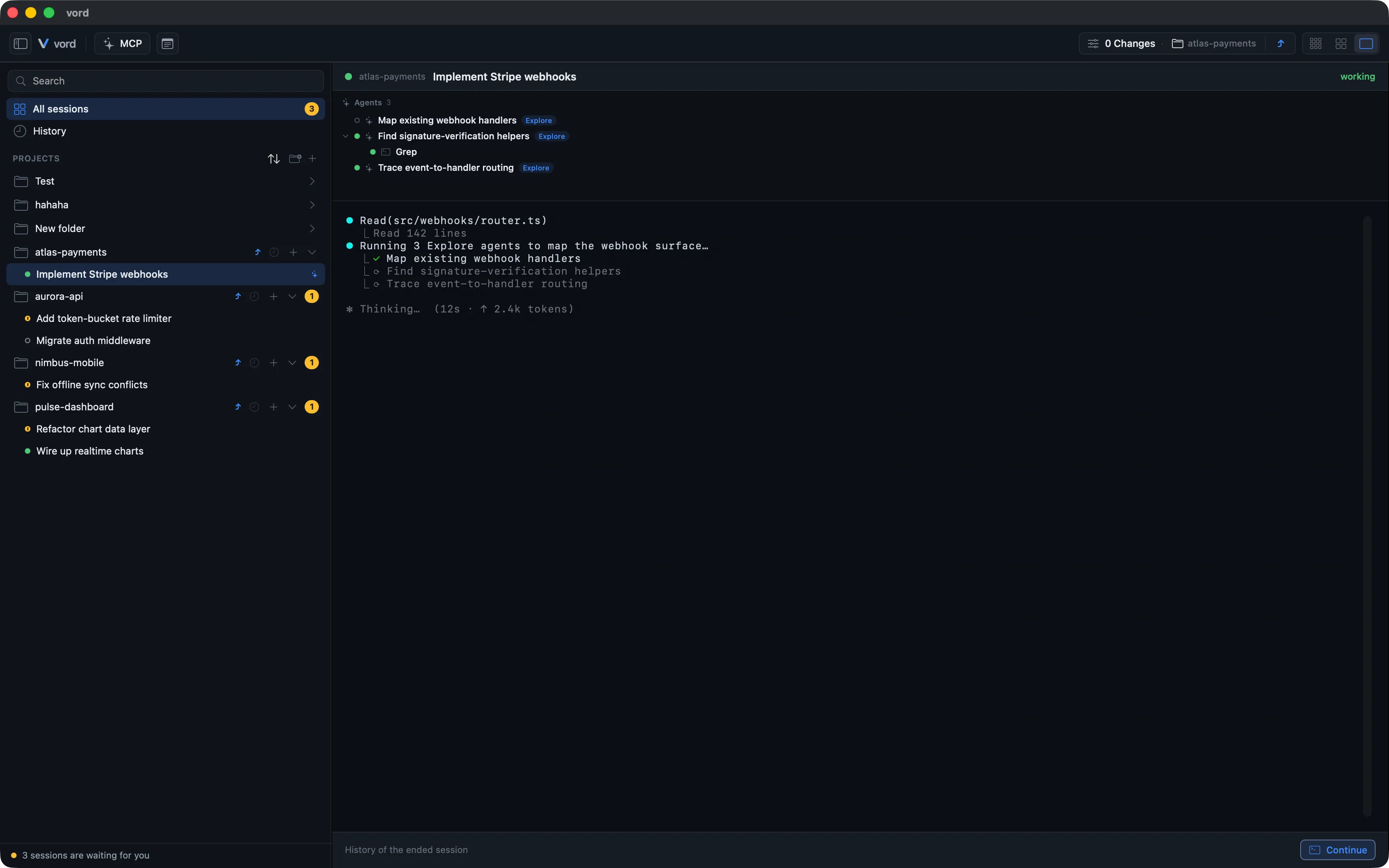
Section titled “The focus tree (nodes, status, metrics, todo, last tool)”Any session that starts subagents — a claude Task/Agent tool call, a codex subagent rollout, a team round, or a /workflow run — grows a collapsible tree directly under its terminal.
- Open a session with subagents in Focus mode or in the right-hand peek panel (click a tile to open the peek).
- The tree appears automatically under the terminal as soon as the first subagent starts. No action needed to enable it.
- Click a row with a disclosure arrow to expand or collapse its children. Everything starts expanded by default.
Each row shows:
| Element | What it means |
|---|---|
| Status dot | Running (🟢), finished (grayed out), or failed |
| Glyph | Agent (sparkles), team (grid), workflow (split), or tool (terminal) |
| Label | The spawn’s description, or the tool name for a raw tool call |
| Type/team/model badges | Subagent type (e.g. “Explore”, “code-reviewer”), team name, or requested model, when present |
| Metrics | Compact ⧖ 9m 14s · ↑ 36.9k — elapsed time and tokens. The agent’s own reported runtime wins; otherwise vord counts from when the subagent actually started |
| To-do line | “done/total” plus the current open step, if the node is running a to-do list |
| Trust note | · no response for 8m (amber) or · probably finished — see below |
| Last tool | · Grep style trailer showing the most recent tool call on that node |
Nesting is recursive — a subagent that itself spawns tools or further subagents shows its children indented underneath, at any depth.
Two node kinds behave differently from a plain finished/running subagent:
- Team members don’t have a hard “done” state. A team round finishes a turn and goes idle, not exited — it can pick up a follow-up assignment. The tree shows this as its own idle state rather than the grayed-out “finished” look a one-shot subagent gets.
- Workflow steps are grouped under a single workflow root node, so a multi-step
/workflowrun reads as one branch rather than a flat list of agents.
“Running” has to be earned
Section titled ““Running” has to be earned”A green dot in the tree isn’t just “we saw a start event and no stop event”. Claude Code’s subagent start/stop hooks drop events under load, so a purely event-driven tree would keep an agent green forever after a lost stop.
vord therefore requires a recent pulse: the subagent’s transcript file must have been written to recently. Two honest labels come out of that:
· no response for 8m(amber) — the node is still tracked as running, but nothing has come from it in over five minutes. This is not the same as “finished”: the agent may well be deep inside a longBashcall. vord just stops pretending it knows. The five-minute threshold is deliberately generous, since a build or a test run can easily go minutes without writing a line.· probably finished— vord’s safety net closed the node. That net exists for the case where a stop event vanishes and the transcript never ends cleanly (a hard kill, for instance): once the session’s own screen has demonstrably gone quiet, running nodes get closed so the tile doesn’t stay green forever. Because nobody actually saw those agents stop, they’re labeled as assumed rather than confirmed. A later real start or a cleanly finished transcript replaces the assumption with fact.
Neither label needs configuration, and neither changes the counter badge — a node that “probably finished” counts as done, one that isn’t responding counts as still running.
The compact counter badge (✦ done/total)
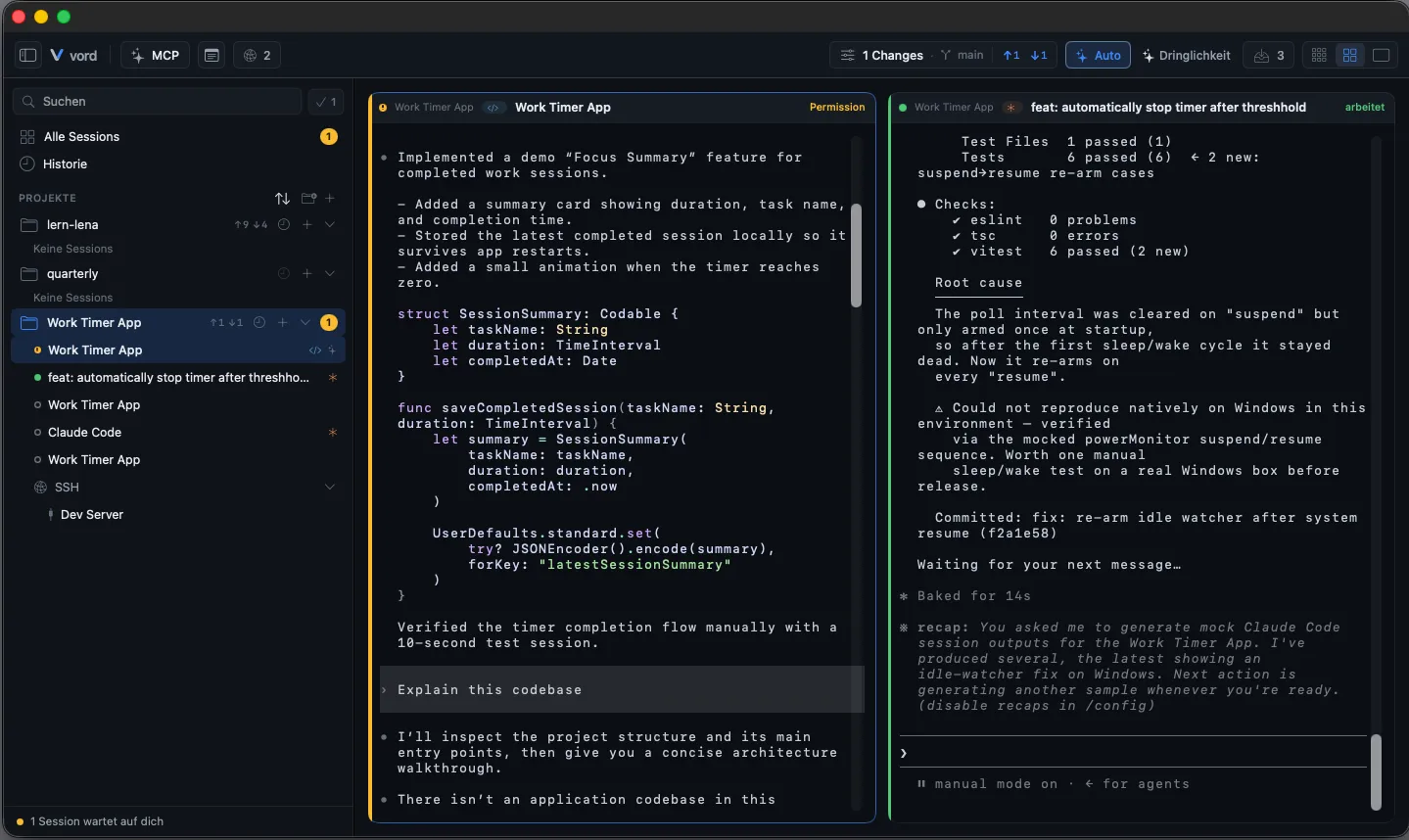
Section titled “The compact counter badge (✦ done/total)”Next to the tree, tiles carry a small “✦ 1/3”-style badge — accent-colored while at least one subagent is still running, dimmed once everything’s done. It counts real agent nodes only (.agent/.team/.workflow); raw tool calls inside a subagent don’t add to the total.
It shows up automatically the moment a session starts subagents, in both the cockpit tile header and the sidebar row. In the cockpit, hovering the tile header expands the counter to “X/Y · Z running” and makes it clickable — a click opens the full agent tree in a popover right on the tile, so you get the detail without switching into focus. (In focus the tree already sits under the header; the sidebar row keeps the plain tooltip “Subagents: X of Y done, Z running.”)

Where it shows (setting: off / focus only / everywhere)
Section titled “Where it shows (setting: off / focus only / everywhere)”You control how visible all of this is in Settings → Workspace → Cockpit & Tiles → Subagents → “Where to show running subagents”:
| Option | Cockpit/sidebar counter badge | Full tree in focus/peek |
|---|---|---|
| Off | Hidden | Hidden |
| Focus only | Hidden | Shown |
| Everywhere (default) | Shown | Shown |
“Off” hides the hierarchy everywhere, including the focus tree — there’s no in-between where the tree exists but nothing signals it. “Focus only” keeps the cockpit and sidebar clean of counters while still giving you the full tree once you’re in focus, where there’s room for it.
This setting applies to no license tier gate — it’s available on Basic and Pro alike.
The agent badge (claude terracotta, codex cyan, kimi violet)
Section titled “The agent badge (claude terracotta, codex cyan, kimi violet)”A small pill or icon on every tile shows which coding agent is running there: claude in terracotta with an asterisk icon, codex in cyan with a chevron-slash icon, kimi in violet with a moon-stars icon. (The asterisk is deliberate — the sparkle ✦ is already the subagent-counter marker, so the agent badge uses a different glyph.) It lives in the cockpit tile header, the focus header, the overview tile, and — as an icon-only variant — the sidebar row.
It’s purely informational; there’s nothing to click. It appears automatically once the agent type is known. A session started through vord — the project row’s “+” button (a terminal with your startup command, typically claude) or the “+ Codex” / “+ Kimi” / “+ Grok” / “+ OpenCode” / “+ Muse” context-menu entries — shows its badge from the first second. A session you typed claude, codex, kimi, grok, or muse into by hand in a plain shell takes a little longer — vord has to detect the agent from its output first, so expect a brief moment with no badge. It never renders anything for a plain shell or SSH session where no agent was detected — vord doesn’t guess.
The 🎯 goal badge (active /goal, claude only)
Section titled “The 🎯 goal badge (active /goal, claude only)”A small 🎯 pill appears wherever the subagent badge lives — focus header, cockpit tile, sidebar row, peek — whenever a claude Code /goal is active: the agent working autonomously across multiple turns toward a completion condition, until an independent evaluator confirms it’s met. The badge is deliberately minimal — it only signals running/not running, never the condition text itself.
It follows the same SubagentDisplay visibility setting described above, since it shares the same UI real estate.
Worker-aware status (no flap while background workers run)
Section titled “Worker-aware status (no flap while background workers run)”Without this, a session running subagents would flicker to “finished” (🟡) for a second or two whenever the main agent wraps up its own turn — even though subagents or workflow workers are still grinding away in the background, and the main agent is about to pick the thread back up.
vord holds the tile at 🟢 until the last worker actually finishes and a short grace period (5 seconds by default) passes without a new work hook firing. That grace period exists specifically to cover the case where the main agent gets reactivated for a next step within seconds of appearing to finish.
This is automatic — nothing to configure, no setting to flip.
Codex caveats (rollout tailer, tool-call miscount, nesting)
Section titled “Codex caveats (rollout tailer, tool-call miscount, nesting)”Codex builds its subagent picture differently from claude, and that difference shows up as a handful of concrete limits:
- No inline transcript. claude represents subagents inline in its main transcript. Codex writes a separate rollout file per subagent (
source.subagent.thread_spawn); vord watches for these files live, including ones created after the session starts, to build the combined tree. - Discovery is time-windowed. Codex subagent discovery scans from session start onward (
scanSince). A subagent rollout file that predates the scan window won’t be found retroactively — in practice this is moot, since subagents only ever get created after the session itself starts. - No
/goal, no plan mode. Codex has neither the/goalautonomous-completion concept nor claude’sExitPlanMode— features tied to those (goal badge, auto plan approval) simply don’t trigger for codex sessions, because codex never enters the states that would fire them. - Peer instructions and context injection don’t reach codex automatically — see Multi-Agent Awareness for the full picture there.
Kimi: the tree comes from kimi’s own session state
Section titled “Kimi: the tree comes from kimi’s own session state”kimi records its agent hierarchy itself: every agent in a session’s state carries a type (main or sub) and its parent’s ID, so vord reads the tree — including nested subagents — directly from kimi’s bookkeeping rather than reconstructing it, and fills in each subagent’s tool activity from its per-agent log. That file-level record is the only source here: unlike claude, kimi’s subagent hooks carry no agent ID, so there is nothing to correlate them against a node. The tree and the ✦ counter stay live off the session state and the per-agent logs alone.
The same quirk shapes when a kimi tile turns 🟡. Every agent in a kimi session shares one hook channel, and each one stamps its events with the main session’s ID — so a finishing swarm worker looks exactly like the main agent finishing. vord therefore ignores those hooks as an end-of-turn signal for any session running an agent swarm, and takes the main agent’s own log as the sole authority for “done”. A running swarm can only ever hold that moment back; it never triggers it. In practice: the tile stays 🟢 until the main agent has finished and the last worker has stopped — so a swarm session no longer flips to “waiting for you” mid-run.
One caveat in the other direction: kimi has no /goal equivalent, so the 🎯 goal badge never appears on a kimi tile — same as codex.
Grok: the tree comes from subagents/*/meta.json
Section titled “Grok: the tree comes from subagents/*/meta.json”Grok’s own spawn_subagent writes a meta.json per worker (type, description, status, model, start/end). vord watches that folder and builds the same focus tree and ✦ counter as for claude and kimi. The nodes stay flat under the main session — Grok records the parent session, not a nest of workers.
On vord, staged workflow gates run over child tiles as workflow blueprints.
Muse: child sessions vord starts
Section titled “Muse: child sessions vord starts”Muse is a first-class hosted agent with the same cockpit badge and child-session tiles as the others. Child sessions that vord starts tell Muse to trust the folder for that run only; the trust is not saved. A Muse session you start yourself in a new folder still shows Muse’s own trust question as a 🟡 box. Follow-ups during a running Muse turn are queued until the turn ends.
For the broader set of behavioral differences between the agents — not just subagent handling — see Claude, Codex, Kimi, OpenCode, Grok & Muse.
Related
Section titled “Related”- Multi-Agent Awareness & Teamwork — peer presence, shared instructions, and the
vord-peerscommand when several vord sessions run at once. - Claude, Codex, Kimi, OpenCode, Grok & Muse — What Differs — the full comparison table beyond subagents.
- Controlling Sessions from iPhone — the iPhone companion mirrors this same subagent progress and status, including the active-agents bar with the same pulse rules. Pro only.