Auto-Pilot
Auto-Pilot is vord’s rule engine for the moments you’d otherwise babysit — a permission box, a plan waiting for approval, a turn that just finished. You write rules that say when to fire and what to do, and vord fires them for you. Nothing happens automatically until you turn it on.
The master switch
Section titled “The master switch”Everything in this page lives behind one switch: Settings → Agents → Automation → Auto-respond to triggers. It’s off by default.
While it’s off, no rule fires, no text gets sent, no box gets approved — vord only does what’s already visible on screen. Turning it on doesn’t retroactively enable anything risky either: rules you create start disabled, and enabling them is a separate step (see below).
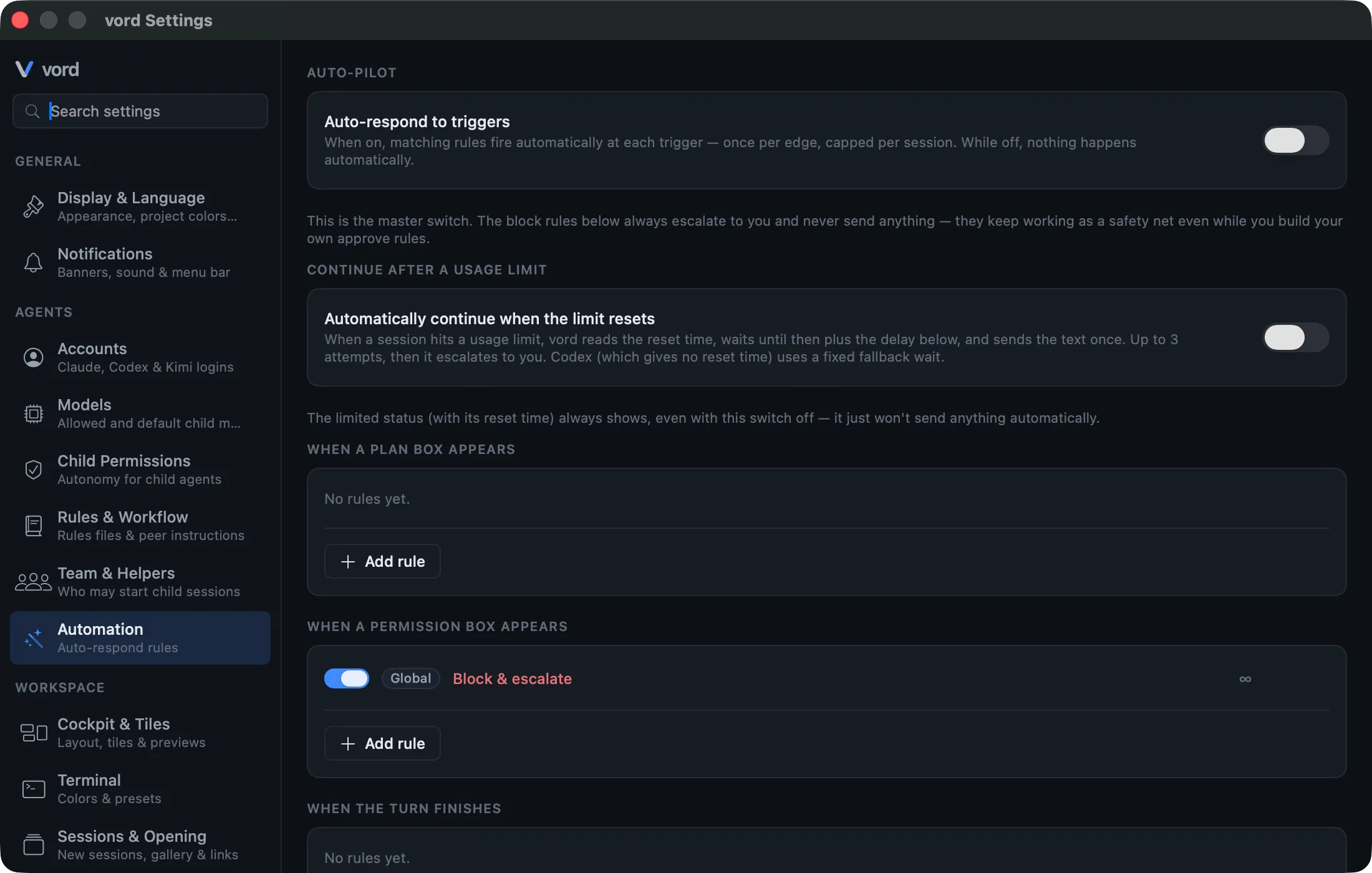
Rules: trigger + action + scope
Section titled “Rules: trigger + action + scope”A rule is built from three parts:
- Trigger — when the rule is even considered.
- Action — what it does when it fires.
- Scope — where it applies, plus an optional per-session limit.
Triggers
Section titled “Triggers”Rules are grouped into four cards, one per trigger:
| Trigger | Fires when |
|---|---|
| When a plan box appears | The session just presented a plan waiting for ExitPlanMode approval. |
| When a permission box appears | The agent needs a yes/no on a tool call. |
| When the turn finishes | The agent’s turn just ended and the session is idle. |
| When the last reply contains a keyword | The most recent assistant message (not the rest of the terminal output) matches a pattern. |
Each trigger only fires once per fresh edge — a session sitting in a stable wait state doesn’t re-fire the same rule over and over.
For the keyword trigger, the pattern is a case-insensitive substring match. Separate multiple terms with | for an OR list (there’s no AND and no wildcards) — an info button next to the field explains the format with examples.
Actions
Section titled “Actions”| Action | What it does |
|---|---|
| Approve | Sends the default confirmation for the box (Enter on the default option). |
| Send text | Sends a fixed text you write, up to 280 characters. |
| Block & escalate | Sends nothing and leaves the session waiting for you — the deliberate “do nothing” action. |
Scope and per-session limits
Section titled “Scope and per-session limits”Every rule applies either globally (across all projects) or to one specific project, picked from a dropdown. You can also cap how many times a rule is allowed to fire per session (a stepper, minimum 1) — leave it uncapped and it fires every time its trigger matches.
Building a rule
Section titled “Building a rule”- Open Settings → Agents → Automation.
- In the trigger card that matches what you want to automate, click Add rule. This opens the rule editor as a sheet.
- Pick an action: Approve, Send text, or Block & escalate.
- If you picked Send text, type the text to send.
- If the trigger is keyword, type the pattern in the Keyword in the last reply field.
- Pick a scope: Global or a specific project.
- Optionally turn on a session limit and set the count.
- New rules start disabled — the editor’s Active toggle is off until you turn it on. Flip it on to arm the rule, then click Save. Leave it off to stage the rule without it running yet; you can arm it later from the row’s checkbox.
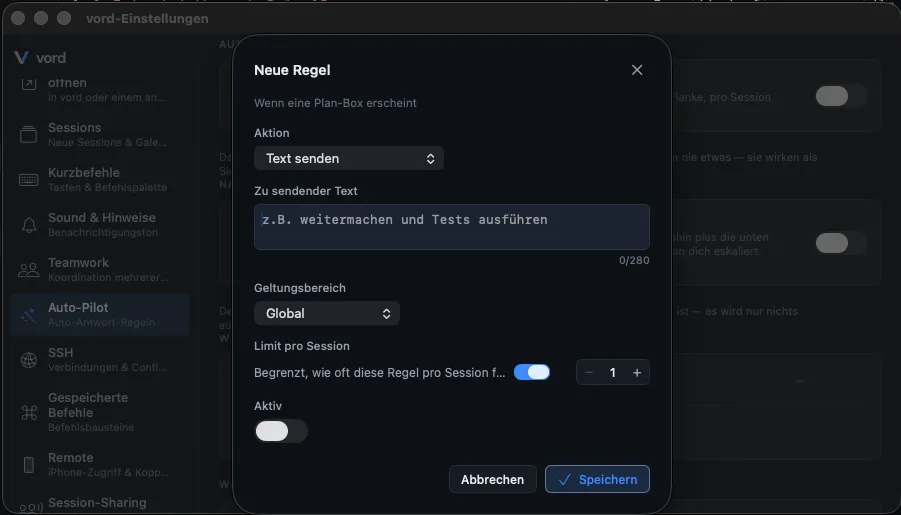
Existing rules show up as rows inside their trigger card, each with a live on/off checkbox and Edit/Delete icons that appear on hover.
The safety model
Section titled “The safety model”Three things keep Auto-Pilot from turning into an unsupervised script:
- Block rules always win. If a
Block & escalaterule and anApprove/Send textrule both match the same trigger state, the block rule takes priority — Auto-Pilot can never accidentally wave through something it’s also configured to refuse. Block rules also ignoremaxPerSession: the protection never runs out. - vord ships one active rule by default: a
Block & escalaterule on permission boxes that matches destructive keywords (rm,--force,push,sudo,delete,drop). It’s there from the first install, before you’ve configured anything. - Plan approval re-checks the actual box content, not just the trigger name (see below) — a mismatch between what fired and what’s really on screen doesn’t get silently approved.
- Permission approval requires proof for the current prompt, not merely proof that the session used hooks earlier. A question that output detection mistakes for a permission prompt therefore stays unanswered.
Auto plan-approval
Section titled “Auto plan-approval”An Approve rule on the plan box trigger only confirms a real ExitPlanMode box — the one with “Yes, and bypass permissions” / “auto-accept edits” as the first option (kimi renders its own variant, “Ready to build with this plan?” with Approve as option 1).
This path has its own verification, separate from the general rule mechanism, because of a prior incident where a plan-approval rule fired on unrelated question or permission boxes. Today it fires only when either:
- the agent’s
ExitPlanModehook actually reported the.planstate (claude and kimi both emit it), or - the visible box content itself carries a genuine plan-approval signature and shows no question or permission signals — a safety net for sessions without a verified hook.
Set it up like any other rule: trigger When a plan box appears, action Approve.
Permission approval across agents
Section titled “Permission approval across agents”The Approve action on the permission trigger requires proof for the permission prompt that is open right now. For claude, codex, kimi and muse, a current PermissionRequest hook is that proof. A hook seen earlier in the session is deliberately not enough: if terminal output later resembles a permission prompt but is actually a question, Auto-Pilot remains closed. Grok never emits that hook (its HTTP hook path is blocked), so grok always uses the structural box fallback below — never a hook. For OpenCode, the proof is stronger: its event stream emits a dedicated permission event carrying the tool name, the concrete command, and, when available, the provider’s suggested permanent rule.
Two hard rules sit on top of that proof:
- A question is never a permission. Newer claude versions emit a
PermissionRequesthook for theAskUserQuestiontool itself; vord classifies that hook as what it is — a question — so it can never serve as the proof above. - Visible question content vetoes any auto-confirm. If the box on screen carries question signals (claude’s
☐tab / “Type something.” option / “Enter to select” footer, codex’s “enter to submit answer” footer, kimi’s question footer), no permission rule fires — no matter which source reported the state. In doubt, the box waits for you.
Codex lifecycle hooks only start firing after you’ve granted TUI trust once per project. kimi has full lifecycle hooks only when the session was started from vord. Grok has no permission hook at all. For hook-less codex, kimi, and grok sessions, vord therefore offers a narrower fallback. Their permission box can be auto-confirmed only when all of the following hold:
- vord has independently learned from the session’s real output that this is that agent (not guessed).
- The box is structurally verified as that agent’s approval box — for codex and kimi: matching title, matching footer, and a live selection cursor actually rendered on screen (not just text an agent printed while talking about a box). For grok: the permission footer (
N/M:select,Tab:next option) plus a live radio selection (●) on screen. - You have an enabled
Approverule on the permission trigger for that project or globally — this is what turns the path on; there’s no separate toggle beyond the rule itself.
Grok’s permission box pre-selects the far-reaching always-approve option. Auto-Pilot therefore never sends Return there; it types the digit for the one-time Yes option instead.
OpenCode has no hook-less variant for this decision: its event stream always supplies the typed permission event. That means Auto-Pilot never has to infer an OpenCode permission from terminal-shaped text. The same safety rule still applies: an OpenCode question is never a permission, and a permission rule cannot answer it.
Neither the hook path nor the structural fallback applies to question boxes or plan boxes. A question from claude, codex, kimi, grok, OpenCode, or muse never gets auto-dismissed by a permission rule.
How an auto-answer reaches kimi and grok differs under the hood: their boxes accept a bare option digit as an immediate choice, and a bracketed paste with an attached Return would confirm the wrong option (grok) or land as a newline in the composer (kimi). So Auto-Pilot sends them a bare keystroke (the digit, or a bare Return for kimi Enter-style approvals), while claude and codex keep the paste-based delivery. Nothing to configure — vord picks per session.
Related
Section titled “Related”- Responding to a Waiting Session — the four wait reasons Auto-Pilot’s triggers map onto.
- Usage Limits & Auto-Continue — the separate, time-based automation for rate limits, not part of the rule engine above.
- API Errors & Auto-Retry — the automation for turns killed by provider or network errors, also separate from the rule engine.
- Permission Modes — how claude’s and codex’s own approval modes interact with what Auto-Pilot sees.
- Claude, Codex, Kimi, OpenCode, Grok & Muse — the structural differences behind the codex/kimi carve-out above.