Usage Limits & Auto-Continue
Coding agents run into rate limits — a 5-hour session window, a weekly cap, a monthly
spend cap. vord shows a ⏳ status when it detects a limit and displays a reset time
when one is available. Auto-Continue is optional and off by default; it is available
for all supported agents except Kimi. Kimi sessions show the limit, and you continue
them yourself when you are ready. For Claude, Codex, Kimi, Grok, and Muse, vord reads
the limit message a session prints, and for Claude, Codex, Kimi, and Muse also the
provider’s own session records. OpenCode
reports the same condition as typed session events instead: a session error
with HTTP 429 (with the provider’s retry advice and, sometimes, response headers
carrying a real return time), or — for OpenCode Go quotas — a retry status that names
the quota reason and the time OpenCode will try again by itself. If that event has no
next time, vord still enters the usage-limit waiting state. It looks up the
reported usage pool for the model in use (such as MiniMax Token Plan or OpenCode Go) and
use its reset only when a matching pool window is exhausted and has a future reset.
Detecting a usage limit (the ⏳ status and countdown)
Section titled “Detecting a usage limit (the ⏳ status and countdown)”vord watches a session’s visible terminal output for a usage-limit message, except for OpenCode, where it consumes the typed session events (the 429 session error and the quota retry status). When it finds a limit, the session gets its own status: ⏳, distinct from the normal 🟢 working / 🟡 waiting-on-you / ⚪️ idle traffic light. In the sidebar the ⏳ dot marks the session; on the session card and in the focus header it also shows a live countdown, in place of the usual “waiting Xs/Xm” timer: “⏳ in 1h 45m (20:50)”, ticking down toward a known reset time. Under an hour it drops the hours: “⏳ in 45m (20:50)”.
Besides the screen, vord reads the limit from the records each agent keeps for itself:
the rejection entry in Claude’s conversation log (it carries the real reset time), a
Codex turn that ends with a usage-limit error in its rollout file, and a failed turn in
Kimi’s wire log (turn.ended with a failure, as written by Kimi’s wire protocol 1.5). A
limit is therefore recognized even when the message never shows on screen — a Kimi
session waits as ⏳ instead of dropping to idle, and a Codex turn that ends at the limit
no longer counts as “done”.
A Kimi turn that died at the provider never counts as “done” either, whatever the reason. Its wire record ends the turn the same way a successful one does, so vord used to read it as finished — and a Kimi child that had just run into the 5-hour limit reported “finished its turn” to the agent that started it, with nothing delivered. A failed turn now ends as what it is: ⏳ with the countdown when the provider named a quota, an API error otherwise — never a finished one.
Claude Code 2.1.234 and later can continue on its own after a limit and says so in a footer line. “Usage limit reached · continuing automatically at 11:30pm” counts as a limit with that reset time; “Usage limit reached · continuing shortly” and “… continuing automatically when it resets” count as a limit whose time the line doesn’t state. Lines announcing that the limit is over — “Your usage limit has reset · press enter to continue”, “Usage limit reset · continuing automatically” — are not a limit.
A clock is only ever shown when the reset time is backed: the provider stated it, or
the quota data for the session’s account or model pool shows it (see
Where the reset time comes from). Several limit
messages name no reset time at all (see the table below). Without a backed time, the
card says “limit reached · reset unknown” instead of an invented time. For an
OpenCode limit without next and without an exhausted matching pool window, vord
shows that waiting state without a countdown. When the matching pool has a known
reset, its countdown is shown as usual. For agents with Auto-Continue, a time-less
limit may show a wait until the next attempt, not a promised reset.
vord recognizes the limit message even when the terminal wraps it across several lines — a narrow tile splits Kimi’s 403 right in the middle of “…for this / billing cycle…”, and vord stitches the continuation back on before classifying it. Without that, the same session could be read as a Kimi limit in a wide tile and as a Codex limit in a narrow one.
A limit message that is only quoted on screen is not a limit of the session. vord ignores the wording inside a string literal or quotation marks, a code comment, a diff line — including Claude Code’s numbered diff view, changed and unchanged lines alike — and a Markdown quote, list, or table row. An agent working on code or docs that contain limit wording therefore keeps its normal status.
Grok has no limit event in its session log, and a Kimi session on a wire protocol older than 1.5 does not record a failed turn. For those sessions the screen can still start ⏳, but only when the limit line is the latest thing the agent printed. The agent’s own chrome (the composer, the mode footer, Kimi’s tip line) may sit under it. The same wording with later work under it — a command, a tool result, more output — does not start a limit. OpenCode never starts one from the terminal: while its session event stream is connected, only the typed 429 error and the quota retry status do.
Claude’s own “Usage limit reached · continuing …” line counts on the terminal only where
Claude itself renders it: in a Claude session, directly behind Claude’s status marker (⚠ in
the footer under the input box, ⏺ in the transcript). The same words in a file printed with
cat, in a grep hit, or in a tool’s output are work content and leave the status alone.
In a Codex, Grok, Kimi, OpenCode, or Muse session the line never counts as that agent’s limit —
not even when a printed recording of Claude’s screen carries the status marker. A real
limit message directly above such a line still counts: the line only ever stands for
itself, never for the message above it.
One gap remains: a verbatim, unquoted copy of a provider’s classic limit message that carries a reset time — for example a log file printed to the terminal that contains “You’ve hit your session limit · resets 6pm” — looks exactly like the real message and can still show ⏳. It ends as soon as the agent works again or the stated time has passed. For sessions whose own provider record vord already follows (Claude transcript, Codex rollout, Kimi wire from protocol 1.5 on), the screen can no longer open that state at all: there the record alone decides a new limit, and the visible message only holds one that is already running. The printed-copy case can therefore only appear in sessions without such a record (a plain shell, an unresolved agent, an old Kimi wire format).
This detection runs unconditionally — it doesn’t depend on Auto-Pilot or Auto-Continue being on. Turn Auto-Continue off entirely and the ⏳ status with its countdown still shows; only the automatic resend is gated by that switch.
On the iPhone and iPad companion, the same limited status and countdown appear in the Cockpit tile, the session list, and the expanded Session Detail header. The Mac sends the reset time only when it is backed, so the device shows “in …” for a real reset and no countdown for an unknown one; a reset that vord updates while the session is limited reaches the device right away. If the Mac says Auto-Continue is active for that session, the device adds a compact continues automatically line next to the countdown. Older Macs, Auto-Continue off, or an expired reset time leave the mobile UI exactly as it was.
vord scans the full visible terminal screen for the limit message. This is the current write viewport, not the terminal’s scrollback, so a task list, composer, or footer rendered below the message does not hide it from detection. Output that has already scrolled out of the visible viewport is not scanned.
A reset time that’s already in the past, or implausibly far in the future — for
example a claude --resume repainting an old conversation’s stale “resets…” line — is
discarded as stale: no countdown, no auto-continue action for it. The same goes for an
old rejection that vord reads back from an agent’s log after it restarts watching the
session: its reset is worked out from the time the entry was written, not from the time
vord reads it, so yesterday’s “resets 6:30pm” or a days-old rejection without a time is
recognized as over. An old rejection followed by later work in the same log is ignored
as well.
A limit message that never states a reset time (Kimi’s, for example) stays ignored for as long as it keeps showing on screen after the session has moved past it, not just for a fixed few minutes — so a rejection that lingers on screen through a long stretch of real work doesn’t reopen as a fresh limit every time vord rechecks it. Once the line actually leaves the screen, the next appearance of the same message counts as a genuinely new limit again.
What gets recognized
Section titled “What gets recognized”vord distinguishes these limit cases. The last column says where the reset time comes from; only a stated or quota-backed time ever shows a reset clock, everything else says “reset unknown”:
| Limit type | Where it comes from | Reset time |
|---|---|---|
| Session window (5h) | Claude’s per-session usage window (“…resets 7pm”) | Stated — a time of day, never treated as valid beyond 6 hours out |
| Weekly | Claude’s weekly cap | Stated — a date is included |
| Opus weekly | Claude Max’s separate Opus weekly cap | Stated — same format as weekly |
| Claude continuing by itself | Claude Code’s footer “Usage limit reached · continuing automatically at …” | Stated — the time in the footer |
| Claude continuing by itself, no time | “Usage limit reached · continuing shortly” / “… when it resets” | Not stated — from quota data if a usage window is used up, otherwise unknown |
| Monthly spend | Claude’s monthly spend limit (“You’ve hit your monthly spend limit”) | Not stated — it only blocks together with a used-up usage window, so that window’s reset from quota data, otherwise unknown |
| Model-specific | Claude’s per-model cap (“You’ve reached your <model> limit. Run /usage-credits to continue or switch models with /model.”) — recognized for any model name, not a fixed list | Not stated — from quota data if the model’s window is used up, otherwise unknown; switching models with /model or buying credits ends it as soon as the agent works again |
| Codex with a stated time | Current Codex rate-limit messages, which name the time after “try again at …” | Stated — parsed from the message and shown as a clock |
| Codex without a time | Older Codex wording, the workspace “out of credits” notice, and a turn that Codex ends with a usage-limit error | Not stated — from quota data if a usage window is used up, otherwise unknown with a configurable fallback delay for the next attempt |
| Kimi 5-hour window | Kimi’s rolling 5-hour window (429 “…usage limit for this period…”, or 403 “You’ve reached your 5-hour usage limit. Your quota will reset when the current 5-hour window ends.”) | Not stated — shown when available from the account’s quota data; otherwise unknown |
| Kimi billing cycle | Kimi’s weekly quota (403 “…usage limit for this billing cycle…”) or the shared monthly Kimi quota (429 “…kimi monthly usage limit…”) | Not stated — shown when available from the account’s quota data; otherwise unknown |
| Grok with a stated time | A Grok limit message that names when to try again | Stated |
| Grok without a time | Grok’s usage-balance, out-of-credits, spending-limit, credit-limit, weekly-limit, and plan rate-limit messages | Not stated — shown when available from quota data; otherwise unknown |
| OpenCode provider limit | Typed OpenCode session.error event with HTTP status 429 |
Stated when the provider sends it — otherwise from quota data if the session runs on an OpenCode Go model and a window of that plan is used up, otherwise unknown; never estimated |
| OpenCode Go quota (retry status) | OpenCode’s own session.status retry with reason account_rate_limit or free_tier_limit, a “usage limit” message, or a next attempt more than ten minutes away — OpenCode sleeps until then |
Stated — the next time OpenCode itself retries at; vord shows it and adds no attempt of its own |
| Muse | Muse usage-limit wording on screen, plus Muse’s own session records | Stated when Muse names a reset; the measured subscription quota (5-hour window and week) supplies reset times once available, otherwise unknown — never treated as free |
Kimi’s transient 429s (“engine overloaded”, “too many requests”) are deliberately not treated as usage limits — they clear on their own within moments and would stick the session to ⏳ for no reason.
See Claude, Codex, Kimi, OpenCode, Grok & Muse for the bigger picture; the codex specifics are covered in their own section below.
While the limit lasts: ⏳ holds until the agent works again
Section titled “While the limit lasts: ⏳ holds until the agent works again”A usage limit is a state with a start and a proven end — not a status that any passing signal can overwrite. Once a session is ⏳:
- Attempts to continue don’t end it. You typing a message, vord’s own auto-continue, Claude continuing by itself, or resuming the session are attempts. The tile stays ⏳ — it no longer flickers to working, done, or idle and back — and a scheduled auto-continue is not cancelled. If the provider rejects the attempt again, the limit simply goes on.
- Only proof of work ends it, and only work that happened after the limit started: a tool call, Claude’s turn-end or a permission or question box, a real answer in Claude’s conversation log, an agent message, tool call, or completed turn in Codex’s rollout, a completed step or turn in Kimi’s wire log, agent output in Grok’s session updates, or OpenCode waking up from its own retry. A plain shell without any of these counts its working footer — but only while no limit message is visible. For a model-specific cap and Claude’s Opus cap, work done by a subagent doesn’t count: the subagent may be using a different model.
- Without proof, it ends honestly at the reset time. When no work shows up, the limit ends at the reset time — with Auto-Continue on, plus the wait for vord’s own attempt and a 2-minute buffer — and the tile falls back to 🟡 done: the agent is at its prompt, waiting for you.
- Earlier release when the provider resets sooner. If a fresh official quota reading measured after the limit started reports free capacity, the limit ends right away — earlier than the announced reset time. With Auto-Continue on, vord immediately sends its continuation; with Auto-Continue off, the ⏳ state clears and the session is startable again. Without such a reading, vord sticks to the announced reset time.
- Switching the session’s account through vord, or the agent session ending, ends the limit right away.
- An old limit line doesn’t start a new one. After a limit has ended, the same limit message still standing on screen — after a resume, after an account switch, right after the reset — is ignored until it disappears from the screen or its reset time passes (a message without a time: for 10 minutes). A new rejection that the provider reports after that point still counts.
Deliveries wait while a session is limited
Section titled “Deliveries wait while a session is limited”A limited session can’t take work: anything vord pasted into it would only be rejected and prolong the limit. So while the target session is ⏳, vord holds:
- reports from child sessions to a limited parent,
- mesh messages addressed to the session, including those from its own children, and
- for OpenCode sessions, vord’s own context insertions (peer updates and deferred context).
Held items follow as soon as the limit has ended; child reports arrive as one batch. A held report saying that a child is limited is dropped if that child is working again by then — it would no longer be true. In vord’s cockpit, typed messages are sent directly, as is vord’s own auto-continue attempt. An addressed mesh message that is still held after 24 hours is dropped, and a hold is dropped immediately when its session has ended.
A usage limit also never makes your Mac send a “done” notification or push to your iPhone or iPad — including older devices that don’t know the limited status yet and display it as done.
The end of a limit is different. When the limit ends at its reset time without the agent having picked up work (see above), the tile turns 🟡 done. The banner, the Notification Center entry, the bell card, and the iPhone/iPad push all say so explicitly (“its usage limit is over”) instead of the regular “done” wording, for about 30 seconds after the limit ends — the phone gets the Mac’s own wording, the same way it does for any other Mac-driven notification (see Mac-driven text when the Mac is online). If the phone is offline or the app is closed at that moment, Apple delivers the push with the server’s fixed English sentence “A session’s usage limit is over” instead of the generic “A session has finished” — so the lock screen no longer claims the work was done when it wasn’t. (This honest offline wording needs a current server; against an older one the push keeps the previous “finished” text — delivered, just less precise.) Older devices that already displayed the limit as done see no change and get no push for it.
Where the reset time comes from
Section titled “Where the reset time comes from”- The provider states it. A time in the limit message (“resets 7pm”, “try again at …”, “continuing automatically at …”) or in the provider’s own record always wins.
- The account or model pool’s quota data backs it. When the message names no time,
vord uses the quota windows it already reads for the session’s account or
model pool (see Usage and Quotas) — they make no extra
request for this. For Kimi’s 5-hour window that is the reset of the account’s 5-hour
window, because Kimi’s message names exactly that window. For other limits without a
time, only a fully used window (100 %) counts, and the latest of those resets wins —
that’s when everything is free again. OpenCode model IDs map to a specific pool:
minimax-coding-plan/*to MiniMax Token Plan andopencode-go/*to OpenCode Go. Only an exhausted window from the matching pool and account slot can back the reset. - Otherwise it is unknown. The tile says “limit reached · reset unknown”.
OpenCode without
nextshows no countdown when its matching pool also has no reset; other time-less limits may show “auto-retry in …” while Auto-Continue is enabled.
A reset from quota data gets the same clock as a stated one — no separate color. The tile’s tooltip adds “per quota data, as of 23:36”, the time of the measurement it came from, or just “per quota data” when that time isn’t known (for example after vord restarted).
- Late data updates a running limit. If the quota data only arrives while the session is already ⏳, vord moves the wait to the backed reset: same limit, same attempt count, no second child report — and a paired iPhone gets the new time right away.
- A stated time is never replaced by quota data.
- A backed reset stays. If the quota data can’t be read later, the reset vord already took is kept.
- No probing once the time is backed. A limit with a quota-backed reset waits for that time instead of probing, and if the attempt then fails, vord escalates to you as it does for any stated reset.
- OpenCode uses the matching model pool. vord measures OpenCode Go and MiniMax Token Plan separately. A 429 without a return time gets a quota-backed reset only when the running model maps to that pool and one of its windows is fully used up. A free, pay-as-you-go, local, third-party, or not-yet-known model cannot borrow either reset. Without a matching exhausted window, the limit stays visible with reset unknown and no countdown; neither client guesses a reset time.
Which quota data exists depends on the provider: Claude Pro and Max report their 5-hour and 7-day windows through the statusline after the first answer, and Codex keeps its windows in its local rollout files. Where no quota data is reported — for Kimi, Grok, and Muse, or for OpenCode models without a matching measured pool — in the public view of Usage and Quotas, the reset stays unknown.
Auto-continue after reset
Section titled “Auto-continue after reset”While agents are working, vord keeps your Mac awake. The display may sleep and the screen may lock. The same hold covers a running session, a job, a workflow, and a pending auto-continue after a usage limit. Closing the lid of a MacBook on battery still puts the Mac to sleep; agents pause until it wakes.
Turn on “Automatically continue when the limit resets” in Settings → Agents → Automation → “Continue after a usage limit”, and vord takes over once a session hits ⏳. The switch describes itself as: “When a session hits a usage limit, vord reads the reset time, waits until then plus the delay below, and sends the text once. Up to 3 attempts, then it escalates to you. If the provider names no reset time, vord takes it from the account’s quota data, or else waits a fixed fallback time.”
- It waits until the reset time — stated or quota-backed; for a limit without a known reset, until its next probe — plus a configurable delay.
- It sends a continuation message so the session picks back up.
When Claude continues by itself. Current Claude Code resumes on its own after a limit and announces it (“continuing automatically”). vord still continues the session as well: the announcement doesn’t change vord’s plan, and its own attempt goes out after the reset plus your configured delay, exactly as for a limit without the announcement. If Claude has already picked the work back up before that moment, the limit is over and vord’s attempt is dropped. Claude’s own resume prompt (“Your claude.ai usage limit has reset. …”) counts as an attempt, not as proof — the limit ends with Claude’s first real work.
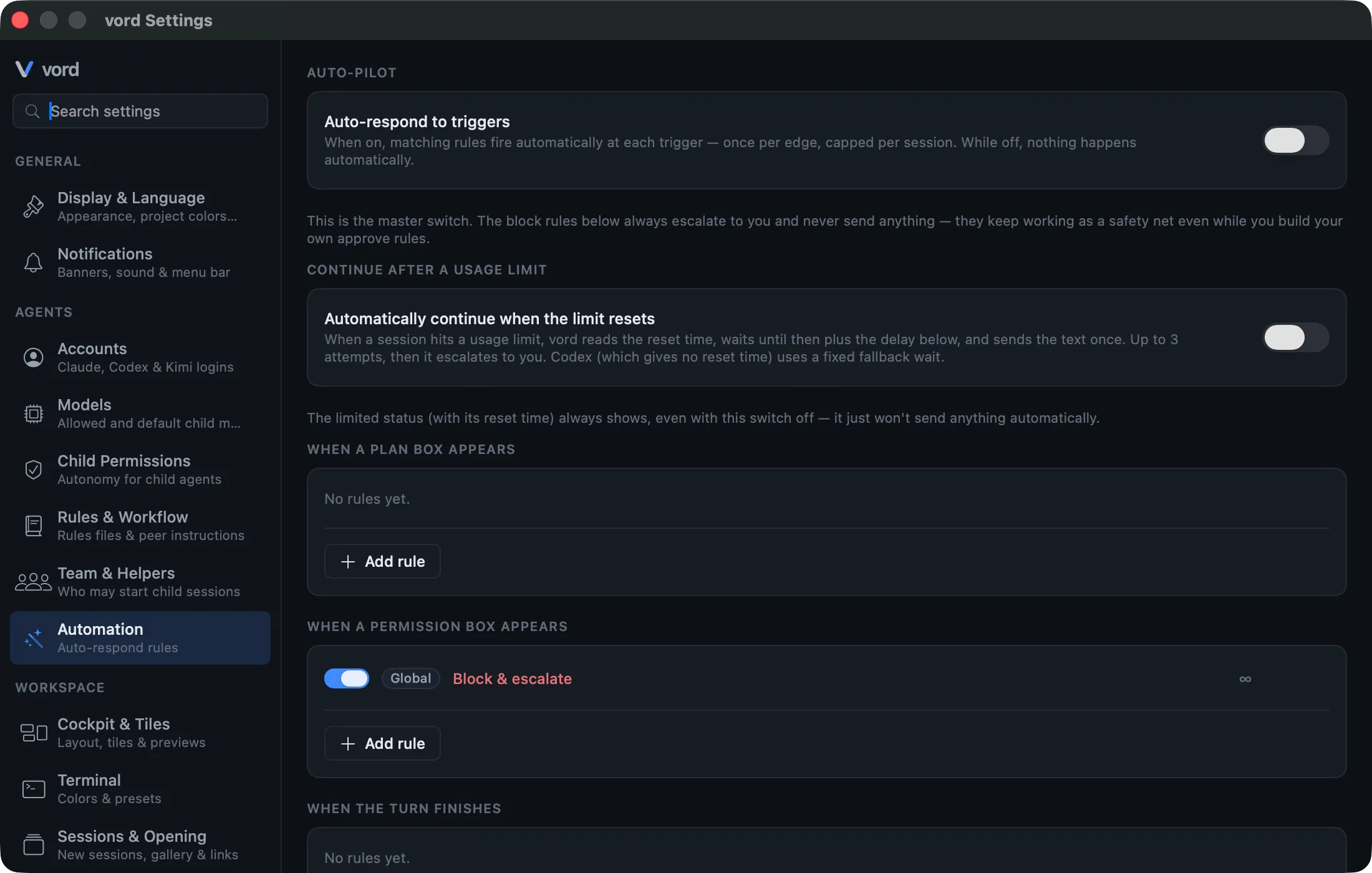
Settings on the card:
- Wait after reset — how long to wait after the limit resets before sending: 30 s, 1 min, or 2 min.
- Retry interval — how often vord retries supported non-Kimi sessions without a known reset: 30 min, 1 h (default), 2 h, or 6 h.
- Message to send — the text sent to continue, up to 280 characters. The default
spells out the situation for the agent: “Your usage limit has reset — you can
continue working without restrictions. Pick up exactly where you left off and finish
the interrupted work.” A bare “continue” left the agent guessing why it had stopped.
If you had previously left this field at the old
continuedefault, vord replaces it with the new wording; a message you wrote yourself is never touched. - Click “Stop and wait” automatically — a separate switch (on by default) covering the rate-limit options box, see below.
For supported agents, vord makes at most 3 automatic attempts per limit episode. If the session is still limited after the last attempt, vord stops trying and tells you. Kimi does not use Auto-Continue; continue a Kimi session yourself after its limit.
For OpenCode, an automatic attempt is armed only at a reliable return time: one the typed
error supplies together with the provider’s permission to retry, or one backed by the
account’s quota data (see Where the reset time comes from).
Without either, vord shows reset unknown and waits for you rather than guessing a delay.
When the limit arrived as OpenCode’s retry status, OpenCode itself resumes at the
stated time; vord shows that countdown and never sends a second continue on top of it.
An authentication error is separate from a 429 usage limit: it asks you to reconnect
with opencode auth login, not to wait for quota.
Near-miss retries are covered. The reset time an agent prints is rounded to the minute, so an attempt can land seconds before the account is actually unblocked — the agent then just prints the limit message again. vord verifies each attempt after the fact: if the session sits idle with the limit message still on screen shortly after an attempt, it re-arms and retries about two minutes later, still counting toward the 3-attempt cap.
Typing wins over the automation. If the screen is actively changing at the moment an attempt would fire — typically because you started typing into the session yourself — vord defers the attempt in 20-second steps (up to about 5 minutes) instead of submitting your half-finished draft. A draft that is simply sitting in the composer still becomes the continuation, as before.
This switch is independent of the Auto-Pilot master switch and its rule engine — it’s a time-based behavior that doesn’t fit the trigger/action rule model covered on the Auto-Pilot page, so it has its own on/off control. The two don’t interact: leaving the Auto-Pilot master switch off (its default) has no effect on this one, and vice versa. Its own safety is structural, described in the next two sections — it never picks a paid option and never touches a real permission box.
Changing limits and Auto-Continue from your iPhone
Section titled “Changing limits and Auto-Continue from your iPhone”With a current Mac, the paired phone can change these switches instead of only showing them: Settings → Mac settings → Automatic carries Auto-continue and Stop and wait instead, and each account card in the phone’s Usage & quota screen gets Edit limit for the same window limits the Mac’s Limits control accepts (5 % to 95 %, in steps of 5) plus Pause this account. Changes run through the same setters as the Mac’s own UI, so they take effect on the Mac immediately, and a rejected change rolls back with the Mac’s message. Against an older Mac the section and the editor are missing and everything stays on the Mac. Full walkthrough: Changing Mac settings from the phone.
The rate-limit options box (always picks the free option, never a paid one)
Section titled “The rate-limit options box (always picks the free option, never a paid one)”Claude sometimes shows a choice box right when the limit hits — “What do you want to do? → 1. Stop and wait for limit to reset…” alongside paid alternatives (buying usage credits, upgrading to a Team plan). With “Click ‘Stop and wait’ automatically” on, vord recognizes this specific box and sends “1” — the free, wait-for-reset option. It never automatically selects a paid option.
vord also handles a related dialog: the monthly spend-limit adjustment prompt (“Adjust monthly spend limit… ❯ Wait for limit to reset”). This one has no numbered options — it’s confirmed with a bare Enter — so vord only sends that Enter when the selection cursor is demonstrably sitting on the free “Wait for limit to reset” option. If the cursor is on the spend-amount option instead, vord sends nothing; confirming there would raise your spend limit.
Both checks classify the visible box structurally (title, options, cursor position) —
a real permission or question box is never misidentified as a rate-limit box, so this
never fires somewhere it shouldn’t. For the numbered box, vord additionally requires
the selection cursor to sit right in front of “1. Stop and wait…” — its default
position when the box appears. A session that merely prints the same words (a log file
shown with cat, a grep hit, an agent writing about this box) is not a choice box
and is never auto-answered. If you moved the cursor to another option yourself, vord
leaves the box to you as well.
If the box appears with a delay after the limit message, or after that message has already scrolled out of the visible window, vord keeps retrying to answer it for the rest of the limit episode (up to roughly 20 minutes), not just once at the moment the limit is first detected.
The draft-protecting two-step send
Section titled “The draft-protecting two-step send”Sending the continuation text isn’t a single blind paste — it’s two steps, designed to protect anything you were already typing:
- A bare Enter, first. If there’s an unfinished draft sitting in the input field, this submits it — your own text becomes the continuation, and vord’s configured message is never glued onto it.
- Only if the session is still limited after that (the bare Enter didn’t start a new turn — an empty field is a no-op) does vord send the configured continuation text as a full paste.
If your draft did start the turn, the session leaves the limited state and the second step never fires.
Verification: vord checks the send actually worked
Section titled “Verification: vord checks the send actually worked”Terminal UIs occasionally swallow the submitting Enter — the continuation text then sits unsent in the input field while the session stays idle. vord doesn’t assume the send worked: a few seconds after each send it verifies that the session actually left the limited state. If it hasn’t:
- A rescue Enter submits whatever is sitting in the input field. Nothing gets duplicated — it only presses Enter on the text that’s already there.
- If the session still doesn’t pick up, vord keeps trying with further rescue Enters at growing intervals (2, 4, 8, 16, 32 seconds). Terminal probes showed a swallowed submit reliably lands on a later plain Enter — while “clear the field and paste again” would duplicate the text, because Escape doesn’t actually clear the field.
- Once the chain is exhausted and the session still hasn’t picked up, vord escalates with the notification described above instead of retrying forever.
Before any rescue keystroke, vord classifies the visible screen: if a permission, question, plan, or tool-approval box is showing, it never presses Enter into it. A pending approval is yours to decide, never the automation’s — in that situation vord stops the rescue and notifies you instead.
Surviving a vord restart
Section titled “Surviving a vord restart”If vord itself quits or restarts while a session is waiting out a limit, the episode is remembered, together with where its reset time came from. The session comes back as a normal inactive session — and the moment you resume it, vord re-arms the wait from the remembered reset time: the session shows ⏳ again and continues automatically, even if the limit message is no longer anywhere in the visible output. If the remembered reset time has already passed by then, nothing is re-armed; resuming simply gives you a normal session.
Codex: stated time, quota data, or unknown
Section titled “Codex: stated time, quota data, or unknown”Codex sessions run through the same output monitoring as Claude sessions, and vord also reads Codex’s rollout file: a turn that Codex ends with a usage-limit error is recognized there and never counts as “done”. When the message states a time (“try again at …”), that time is shown as a countdown. When it doesn’t, vord takes the reset from the account’s quota data if a usage window is used up — Codex keeps its windows in its local rollout files, so this needs no extra setup. Otherwise the session shows “reset unknown”, and auto-continue uses the configurable fallback delay (default 5 hours) for its next attempt — never an estimated clock dressed up as a reset.
While the session is limited, vord polls the account’s Codex quota roughly every five
minutes. vord calls the Codex app server’s rate-limit read (account/rateLimits/read)
for the session’s account — a pure quota query that returns the current window state,
not a model request, and it does not count against your quota. The poll exists only to
detect an earlier release by the provider (a quota window that has opened back up) so
the limit can end before the announced reset time (see
⏳ holds until the agent works again).
If no fresh reading arrives, the limit sticks to the announced reset time.
Kimi: the limit and reset status
Section titled “Kimi: the limit and reset status”vord recognizes Kimi usage limits and shows the session’s ⏳ status. When quota data provides a reset time, vord displays it; otherwise the reset is shown as unknown. Kimi does not use Auto-Continue. When you are ready after the limit, continue the session manually.
OpenCode: typed limit and authentication events
Section titled “OpenCode: typed limit and authentication events”OpenCode does not rely on screen wording for this path. Its session.error event gives
vord a status code, the provider’s retryability decision, and optional HTTP response
headers. Status 429 means the provider exhausted a quota. A supplied return time is
shown as a real countdown; missing timing information remains reset unknown unless
the matching OpenCode model pool has an exhausted window with a known reset. This applies
to MiniMax Token Plan and OpenCode Go. vord does not borrow a
different pool’s reset or derives an estimate from the status code, retryability flag, or
a conventional window length.
Auto-Continue follows the same strict contract: it starts only at a reliable return
time — stated by the provider together with its permission to retry, or backed by quota
data. Without either, OpenCode stays in the visible limited state with reset unknown
and no countdown. Authentication failures remain their own error class and direct you to
opencode auth login; they are never presented as a quota limit.
OpenCode Go quotas arrive as a retry, not as an error. When an OpenCode Go plan
(the built-in opencode-go provider) exhausts its 5-hour or weekly quota, OpenCode
does not end the turn: it schedules its own retry for the moment the quota resets and
sleeps until then, which can be days. On the wire that is a session.status of type
retry carrying the reason (account_rate_limit, or free_tier_limit on the free
tier), the provider’s message, and next, the exact time OpenCode will try again. vord
reads that as a usage limit: the session shows ⏳ with a countdown to next and keeps
that same episode through OpenCode’s own retries. A child reports the limit once to its
parent, and the notification inbox records one message for the episode. vord does not
arm an attempt of its own here — OpenCode already will — so no second continue lands
on top of OpenCode’s retry. A retry that names no quota reason
and is due within ten minutes is an ordinary transient retry and keeps the session
working, as before.
See Claude, Codex, Kimi, OpenCode, Grok & Muse for the full list of differences between the agents.
For the underlying ⏳ status mechanics (how detection works generally, hooks vs. output heuristic), see Status: The Traffic Lights. For the broader Auto-Pilot rule system this feature sits alongside, see Auto-Pilot.