What vord Is
vord is a native macOS app for running several coding-agent sessions at once and knowing, at a glance, which ones need you. It doesn’t run the agents for you — you still type claude, codex, or kimi yourself, in a real terminal. What vord adds is the cockpit around that: a grid of live sessions, a traffic-light status for each one, and the tools to jump between them without losing track of your Git state.
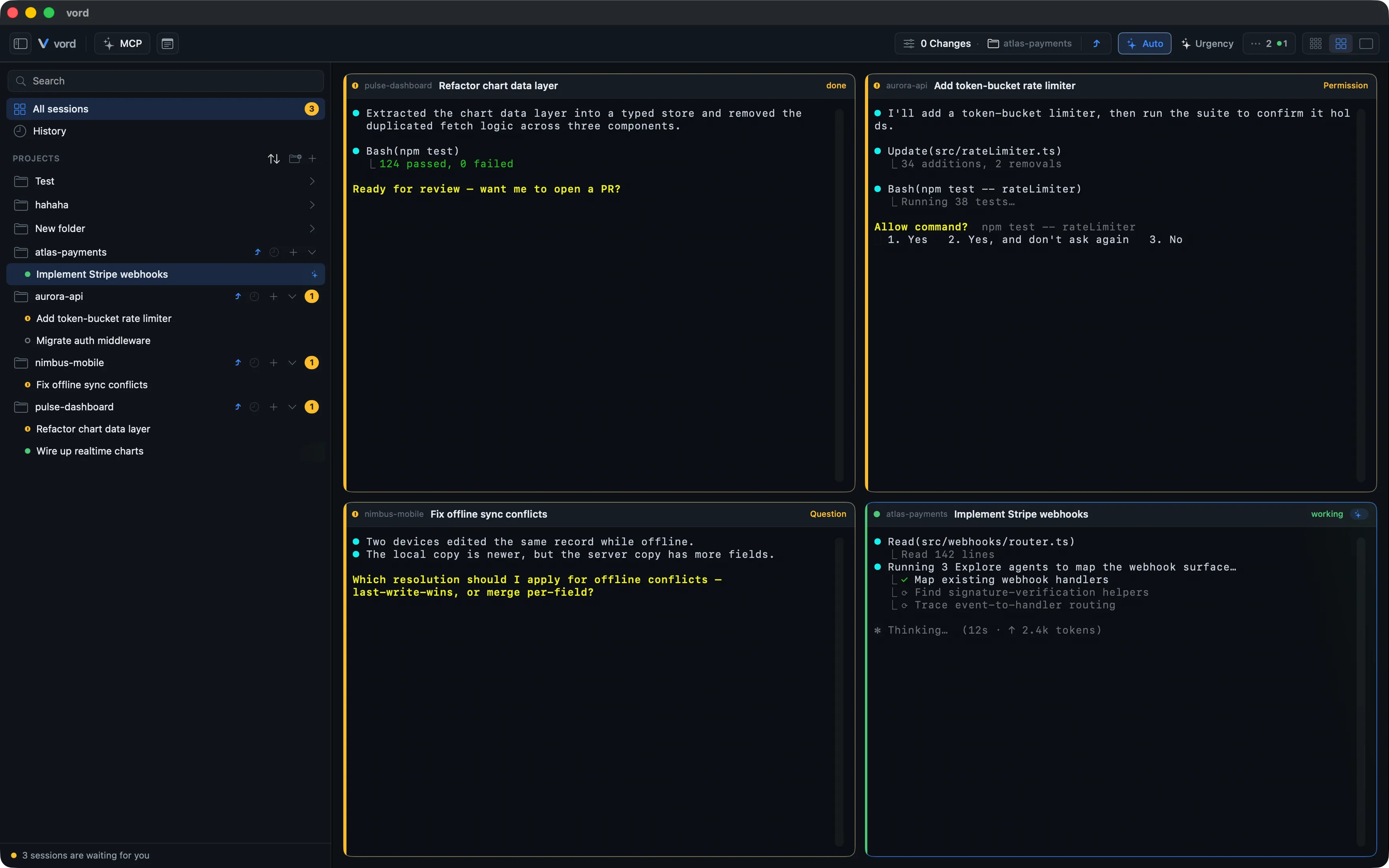
A cockpit for many coding-agent sessions
Section titled “A cockpit for many coding-agent sessions”Open a project, start a terminal, type claude, codex, or kimi, and it shows up as a tile in the cockpit grid — up to 12 at once. Each tile is a real PTY terminal, not a simulation: you can type into it, scroll it, search it, resize it. vord’s job is to watch the output of each one and tell you, without you having to tab through every window, whether it’s still working, waiting on you, or done.
That’s the core loop: start sessions, let vord track them, respond to the ones that turn amber. Everything else in the app — the Git inspector, the built-in browser, notes, MCP servers, SSH, and the iPhone, iPad, or Android companion — exists to support that loop, not to replace it.
claude, codex, and kimi, side by side
Section titled “claude, codex, and kimi, side by side”vord treats claude, codex, and kimi as first-class, side by side in the same grid, with the same status colors and the same keyboard shortcuts. But they aren’t identical under the hood, and vord doesn’t pretend otherwise. Claude gets a hook-based integration that’s more reliable and unlocks a few claude-only things — plan-mode auto-approval, hook-verified permission auto-confirm, and steadier status while background workers run. Codex is detected mostly from its terminal output and needs a one-time trust step in its own TUI before its hooks fire; until then, some of that reliability degrades. kimi’s hooks fire from the first session (vord manages a marked block in kimi’s global config.toml), with its own edges: no usage-limit detection yet, and a newer phone answer path.
Every place this matters, the relevant page says so inline. The full rundown of what differs — permission modes, naming, usage-limit detection, subagent counting, and more — lives on one reference page: Claude vs. Codex vs. Kimi.
What vord does not do
Section titled “What vord does not do”Being direct about the edges matters more than sounding impressive:
- vord is not an agent. It doesn’t call any AI model itself, doesn’t send your code anywhere, and doesn’t have an opinion about what claude, codex, or kimi should do. It starts a plain login shell; you type the agent command.
- vord is not an API-key manager or a CLI installer. You bring your own claude, codex, and/or kimi CLI, installed and authenticated the way you already do it. vord only resolves their path in
$PATHso it can wrap them with hooks. - vord is not a code editor. The built-in file viewer and the Git inspector’s editor are read-first tools for looking at diffs and files quickly — not a replacement for your IDE. Opening a file in your real editor is always one click away.
- vord does not guarantee status accuracy from raw terminal text alone. The output-based fallback detector can misread unusual output; the hook-based path (claude and kimi directly, codex after its trust step) is what makes status trustworthy. See Status: The Traffic Lights for the honest version of this.
Basic vs. Pro at a glance
Section titled “Basic vs. Pro at a glance”Everything described above — the cockpit, status detection, the Git inspector, the terminal, notifications, auto-pilot, MCP servers, SSH — works on the free Basic plan after a 14-day trial. Two things are gated to Pro:
| Basic | Pro | |
|---|---|---|
| Cockpit, sessions, Git inspector, terminal, notifications, auto-pilot, MCP/SSH | Yes | Yes |
| Phone companion (iPhone, iPad, or Android: pairing and remote control) | No | Yes |
| Cross-user session sharing (beta) | No | Yes |
Details on trial length, the signed paid-through boundary, and explicitly perpetual licenses are on Account, License & Trial. Plans, team, devices, and Cloud add-ons are managed in the Hub. Full plan comparison: vord-app.dev/pricing.
Where to go next
Section titled “Where to go next”- The Hub — web admin for plans, team, devices, Brain, Chat, and MCP.
- Install & First Launch — the five-minute path from download to your first running session.
- Status: The Traffic Lights — the green/amber/grey/hourglass system that’s the app’s core idea.
- A Tour of the vord Window — sidebar, cockpit, toolbar, and the side panels, laid out.
- The Android Companion — the vord terminal companion for Android.