Multi-Agent Awareness & Teamwork
When you run several vord sessions at once — same project, different projects, doesn’t matter — vord quietly tells each agent who else is currently working, so two agents don’t step on the same files. The automatic side of that is always on for claude and available for codex once you’ve trusted its hooks. This page covers that peer-awareness channel, the Teamwork settings that let you extend it with your own instructions, and the vord-peers command you can run yourself.
Peers: who else is working right now
Section titled “Peers: who else is working right now”vord tracks every session that’s actually running (status 🟢, process alive, not archived) in a shared peer registry. When a session starts, and again on every prompt you submit, vord checks that registry and — only if something changed — injects a short note into the agent’s context:
- On session start, if peers already exist in the same project: a list of up to 12 who are working, each with title, branch, and working directory. Child sessions are omitted. The start list is never throttled. If your working rules fill the hook context budget, the list waits for the next hook with enough room.
- On later prompts, only the delta: who arrived, who left. No repeat noise if nothing changed.
- When you’re the only one left, a one-line note that you’re now working alone.
This note lands in the model’s context, not in your terminal — you won’t see it appear, but the agent factors it in. The intent is simple: two agents in the same project shouldn’t quietly edit the same file in parallel.
Automatic context injection
Section titled “Automatic context injection”The automatic part — vord pushing this note into the agent’s context without you doing anything — rides on the additionalContext return channel of the SessionStart and UserPromptSubmit hooks. For claude this works out of the box. For codex it works the same way, byte-for-byte, but only after you approve codex’s hooks once in its own TUI trust prompt (codex won’t fire project hooks until you’ve trusted them). Until that one-time trust, a codex session gets no automatic peer note.
For hosted Claude sessions, your working rules stay complete and take priority within each hook response. Other context, including the peer start list and operating manual, waits when it would push the combined response beyond 10,000 characters. Rules longer than that limit are sent alone. A resumed or forked conversation receives only start blocks missing from its transcript since the latest compaction; failed deliveries remain available for retry.
After Codex compacts a hosted terminal session, its trusted SessionStart hook runs before Codex continues and refreshes the current role-specific operating manual and working rules. If the working rules fill the response budget, the manual remains queued for a following prompt. Ordinary prompts do not repeat that manual. Teamwork instructions are refreshed too, while the old peer start list is not replayed; pending peer changes remain available for the next regular update. Failed context deliveries remain eligible for retry. This uses Codex’s documented source=compact hook; the app does not start an extra agent turn or force compaction.
When the project board is on, the first prompt lists each open item on its own line without its “why”, up to 15 items, followed by … and N more when needed. After the first turn, only changes are sent, under Board changes since your last turn; unchanged prompts carry nothing extra. To-dos assigned to someone else still show “(assigned to …)”. While the board is on and empty, that state is a one-line reminder that questions which can wait and to-dos for you belong on the board.
There’s no setting to turn this off — it’s silent by design when you’re working alone (the solo guard, below), so there’s nothing to disable.
The vord-peers terminal command (all agents)
Section titled “The vord-peers terminal command (all agents)”Every session vord starts gets a vord-peers script placed at the front of its PATH automatically — no install step. Any agent (claude, codex, or kimi) can run it directly in the terminal, and so can you:
| Command | Shows |
|---|---|
vord-peers |
Peers in your own project only, plus a one-line hint pointing to --all if agents are running elsewhere |
vord-peers --all |
Every project on this Mac, split into “relevant” (same project) and background |
vord-peers --json |
Same data, machine-readable |
For a codex session that hasn’t trusted its hooks yet, vord-peers is the way to see peers at all — any agent (or you) can run it any time to get the live list. It always excludes your own session. It only ever reads local state (vord’s peers.json on this Mac) — it has no idea about vord Chat peers on other machines; see vord Chat for that separate layer.
For agents working across vord Cloud projects, see Agents in other projects for discovery and messaging with find_agents and send_to_mesh.
Teamwork instructions: free text + conditional rules
Section titled “Teamwork instructions: free text + conditional rules”Beyond the built-in peer list, you can attach your own instructions that only apply when peers are actually present. Open Settings → Agents → Rules & Workflow:
- Shared instruction — a free-text field (up to 280 characters) that’s appended to the peer note every time at least one other agent is working. Use it for standing rules like “coordinate in vord Chat before touching shared files.”
- Conditional rules — click Add rule to add a row that only fires past a peer-count threshold:
- Scope:
Project(peers in the same project) orAll(every peer on the Mac). - Comparison:
≥,≤,=,>, or<. - Threshold: a stepper starting at 1 — a rule can never fire while you’re working alone.
- Text: up to 100 characters, appended when the rule matches.
- Scope:
- Delete a rule with the trash icon.
Every rule that matches gets appended — there’s no “first match wins” here. If three rules all match at once, all three texts get appended alongside your shared instruction.
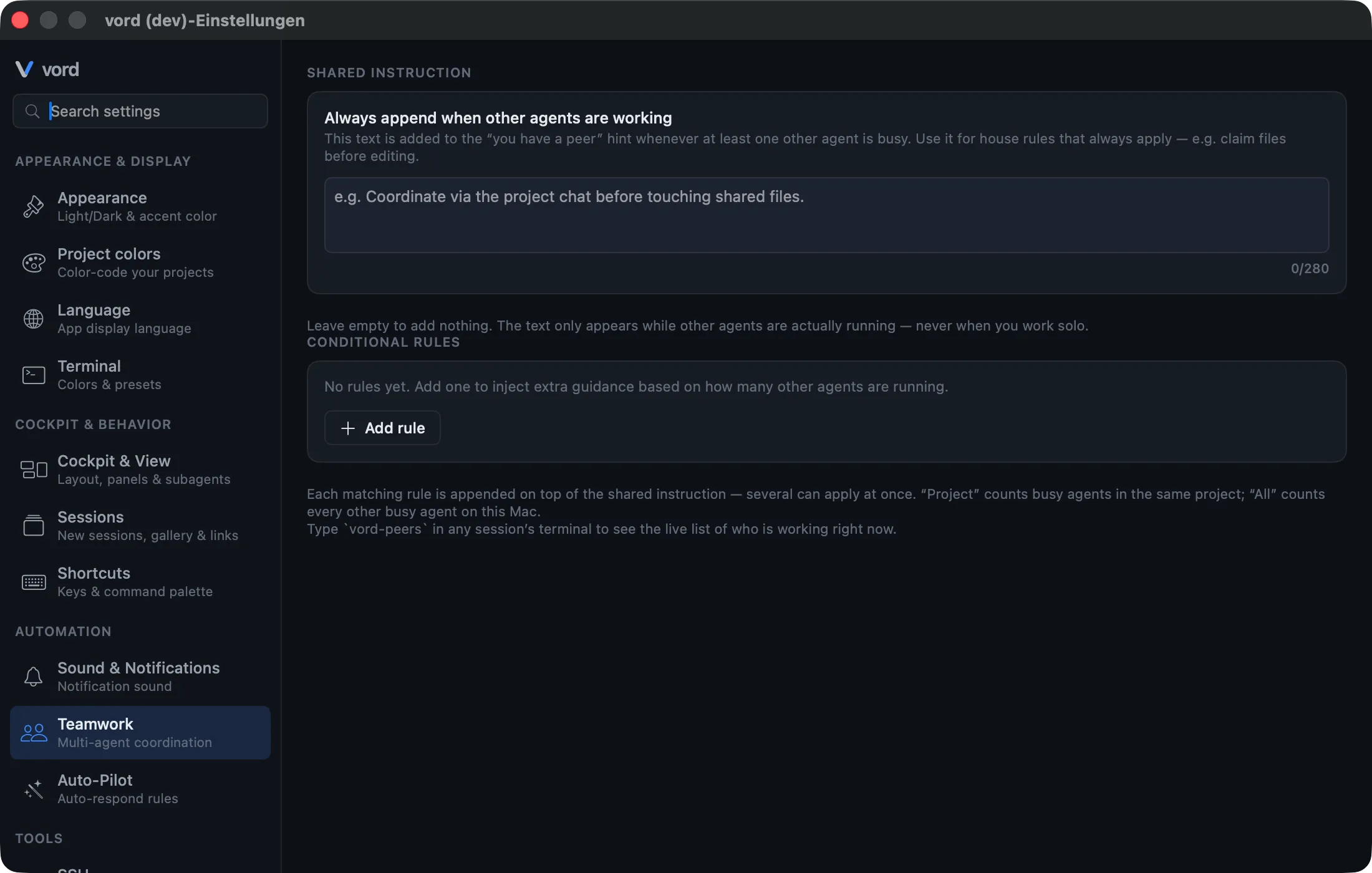
Both fields save immediately — there’s no separate save button.
The solo guard (silent when you work alone)
Section titled “The solo guard (silent when you work alone)”Nothing here fires unless another agent is actually working. No peers, no injected note, no shared instruction, no conditional rule — regardless of what you’ve typed into Teamwork settings. That’s deliberate: the whole point is to reduce collision risk when you’re running several agents in parallel, not to add standing noise to every solo session.
Codex: gated behind hook trust
Section titled “Codex: gated behind hook trust”To be precise about where codex stands: codex has two channels back to vord, and only one carries context.
- Its
notifyscript runs without any trust prompt and reports turn-end (so vord can flip codex to 🟡). It does read the HTTP response but discards it —notifynever carries the peer note or your Teamwork instructions. - Its full hook script does carry context — the same
additionalContextpayload claude gets, with the peer list and your Teamwork instructions — but codex only fires those hooks after you approve them once in its TUI trust prompt.
So an untrusted codex session gets no automatic peer note or Teamwork rules; a trusted one gets exactly what claude gets. Either way, running vord-peers in the terminal always works and shows the live peer list (though not your shared instruction or conditional rules — those only ride the hook channel).
For the full picture of what else differs between the agents, see Claude vs. Codex vs. Kimi and Subagents & the Hierarchy Tree.