Privacy & Your Data
vord runs your own claude/codex/kimi CLIs locally — it doesn’t proxy your prompts through a vord server. This page covers what does leave your machine (diagnostics, if you opt in; encrypted traffic to your paired iPhone) and what stays on disk, plus the honest limits on both.
Where project data lives
Section titled “Where project data lives”Project-scoped data — notes, saved SSH connections, command snippets — is stored in a .vord folder, not tied to vord’s internal project ID. That means it survives removing and re-adding the same folder in vord, and travels with the folder if you move or copy it.
There are two storage locations:
| Location | Scope |
|---|---|
~/.vord |
Global (applies across all projects) |
<project-root>/.vord |
This project only |
Both directories are created with 0700 permissions (owner access only). If the project folder is a Git repo and has no .gitignore yet, vord adds one with a .vord/ entry automatically — it never touches an existing .gitignore uninvited.
Removing a project from vord’s sidebar (“Remove project”) doesn’t delete these files or anything on disk — reopening the same folder later picks the notes, SSH connections, and snippets back up. See Managing Projects for the rest of the project lifecycle.
Terminal transcripts and retention
Section titled “Terminal transcripts and retention”Every session’s raw terminal output is saved to a transcript file so you can replay it later without a running process (see History & Resume). These transcripts can contain anything that passed through your terminal — code, file contents, secrets typed into a prompt.
You control how long they stick around:
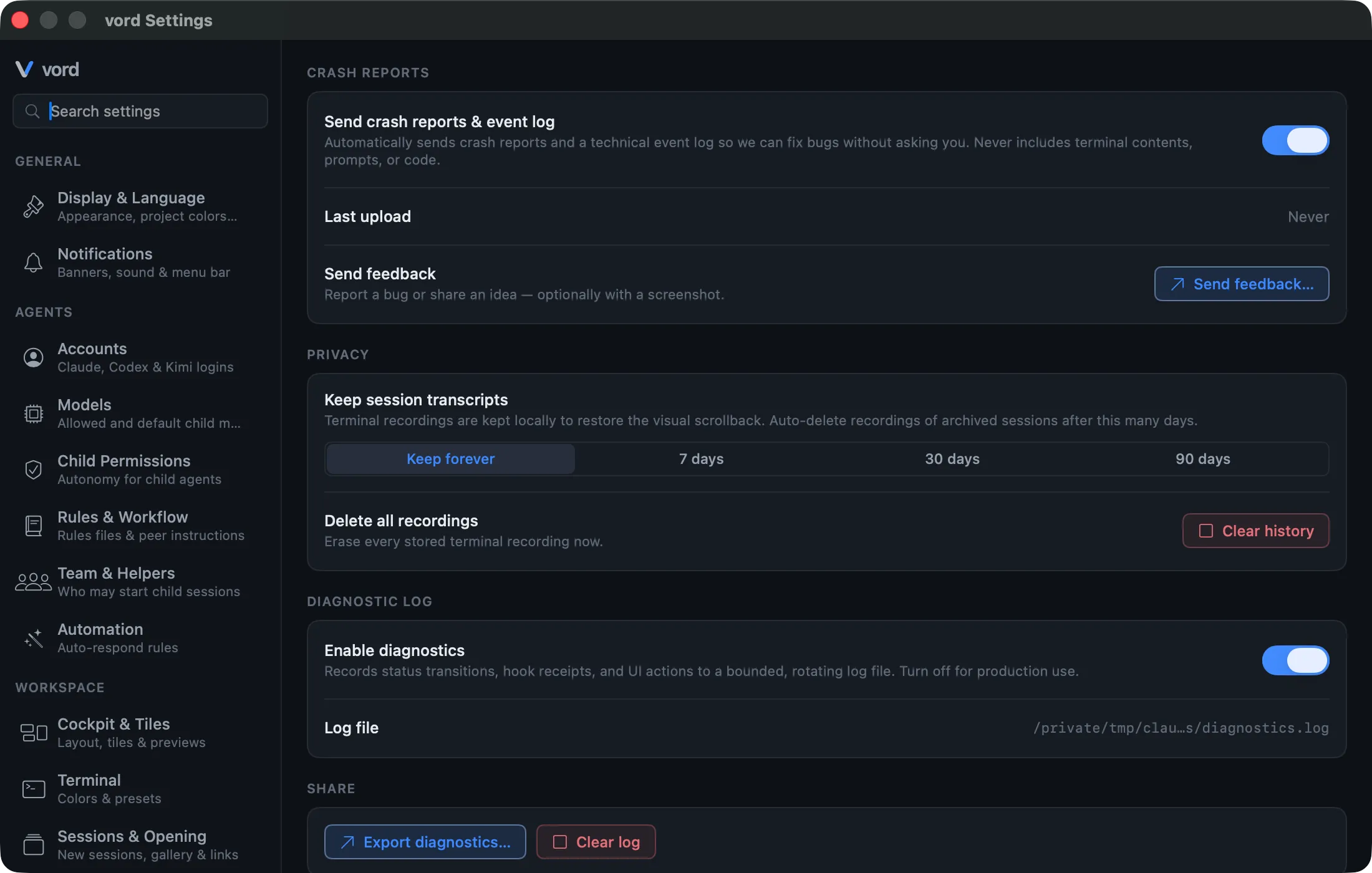
- Open Settings (
⌘,) → Diagnostics. - Under retention, pick Keep forever (default), 7 days, 30 days, or 90 days.
- To wipe everything immediately, click Clear history and confirm — this is irreversible.
Retention only prunes archived sessions — a running, done, or parked session’s transcript is never deleted out from under it. Deleting a transcript removes only the raw terminal bytes; the session itself still shows up in History, just with an empty replay.
The same retention period also removes the persisted conversation of an archived OpenCode child that vord itself started. vord matches the OpenCode ses_… ID stored on that child session and uses OpenCode’s own deletion command; it never selects your top-level OpenCode sessions or any other session. This deletion is permanent, so that child cannot later be resumed. Keep forever does not remove either transcripts or OpenCode child conversations.
OpenCode servers started by vord protect their loopback API with a fresh per-process password held only in the server environment and client memory while the server runs. OpenCode 1.19.0 and OpenCode 2 also pass this variable to Bash-tool subprocesses and configured MCP processes. vord’s generated server configuration clears it for Bash with a local plugin (under OpenCode 2, the plugin also clears the path of vord’s session database) and clears it for vord’s own MCP process. User-configured MCP processes, and wrapper shells running without that plugin, can still inherit the password under the current upstream behavior.
Independent of your retention setting, vord removes orphaned transcript files with no matching session at startup. This cleanup is not configurable.
Crash reports
Section titled “Crash reports”vord asks you once, shortly after first launch, whether it may send crash reports — in every build, not just betas. Until you answer, nothing leaves your Mac. If you decline, you are never asked again and nothing is ever sent; the switch in Settings stays there so you can change your mind either way.
When it is on, vord automatically sends crash reports and a technical event log (status transitions, hook activity, UI actions, and which reports vord passed from a child session to its parent agent — identifiers and outcomes only, never the report itself). A report holds the crash details, the app and system version, your hardware type, and a random ID for this computer. It never includes terminal content, prompts, or code, and home-directory paths plus anything that looks like a token or key are stripped before the report leaves your Mac.
- Open Settings → Account & System → Privacy & Diagnostics.
- Toggle the Send crash reports & event log switch.
Turning consent off immediately clears any pending upload queue — nothing already queued gets sent after you withdraw.
Separately, Send feedback… lets you report a bug or idea, optionally with a screenshot attached. This works regardless of your crash-report consent — it’s a manual, one-off report, not part of the automatic pipeline.
The diagnostic log
Section titled “The diagnostic log”A separate, local-only feature: a rotating log of status changes, hook receipts, and UI actions, kept on your Mac.
- Settings → Account & System → Privacy & Diagnostics → toggle the diagnostic log on/off.
- Export diagnostics… writes a
.txtfile via a save dialog. - Clear log empties the file.
Unlike crash reports, this log is never sent anywhere automatically — export and clear are both fully manual actions.
End-to-end encryption for the iPhone/sharing channel
Section titled “End-to-end encryption for the iPhone/sharing channel”If you pair an iPhone or Android device (see The iPhone Companion or The Android Companion), all session content between your Mac and phone travels end-to-end encrypted (ChaCha20-Poly1305, with a fresh key per connection). The relay server that carries the traffic is a blind switch — it never sees terminal plaintext.
The same holds for Session Sharing: traffic between host and guest is encrypted the same way.
Trial protection (honest)
Section titled “Trial protection (honest)”vord runs a 14-day trial without an activated license. The trial start is protected by an HMAC-signed anchor file stored outside UserDefaults, combined with the highest timestamp ever observed — so turning back your Mac’s clock doesn’t extend the trial.
The code that implements this is explicit about what it is and isn’t: this hardens the trial against a casual reset (deleting a file, turning back the clock), not against a determined attacker. The signing key’s constant part ships in the app binary, and the device identifier it’s combined with is readable by any local process — so the signature is reproducible in principle. That’s an accepted trade-off for a 14-day, offline-checkable trial on your own machine, not a security bug.
When the trial runs out without a valid license, new sessions are locked — the app itself stays usable, and existing sessions keep running. See Account, License & Trial for reactivation and what happens to a paid license that lapses.
Account deletion
Section titled “Account deletion”You request deletion in the Hub under Profile & security (Delete account). Active subscriptions, open payments, owning a team with other members, and owning a project with other members block the request until they are resolved. Ownership is not transferable.
After a six-digit email code, a 30-day grace period starts. The Hub shows Your account will be deleted on {date}. with Cancel deletion. You can keep using the account until then. Booking a plan or add-on during that window cancels the request.
When the date arrives, personal data in the Hub and vord Cloud is deleted (personal vaults, sessions, activations, MCP grants, memberships). Invoices remain (including their snapshots) because of statutory retention. Team vault content stays with the team; authorship in the database is anonymised. Since 14 October 2026, edits in team vaults record only a pseudonymous account ID as author in the version history, never your name or email address; the history view shows your current display name, and Deleted account once the account is gone. Edits made before that date are not rewritten: the version history of shared team notes can still show your name and email address on those earlier edits. The account row is kept as a tombstone so those invoices still have a valid reference.
Name privacy in notifications
Section titled “Name privacy in notifications”When vord is online and drives your notifications centrally, it can either include the session name in the notification text or hide it, depending on a setting under Settings → General → Notifications. With names hidden, your iPhone shows a generic “waiting for you” message with no session name or project subtitle — useful if your lock screen is visible to others.