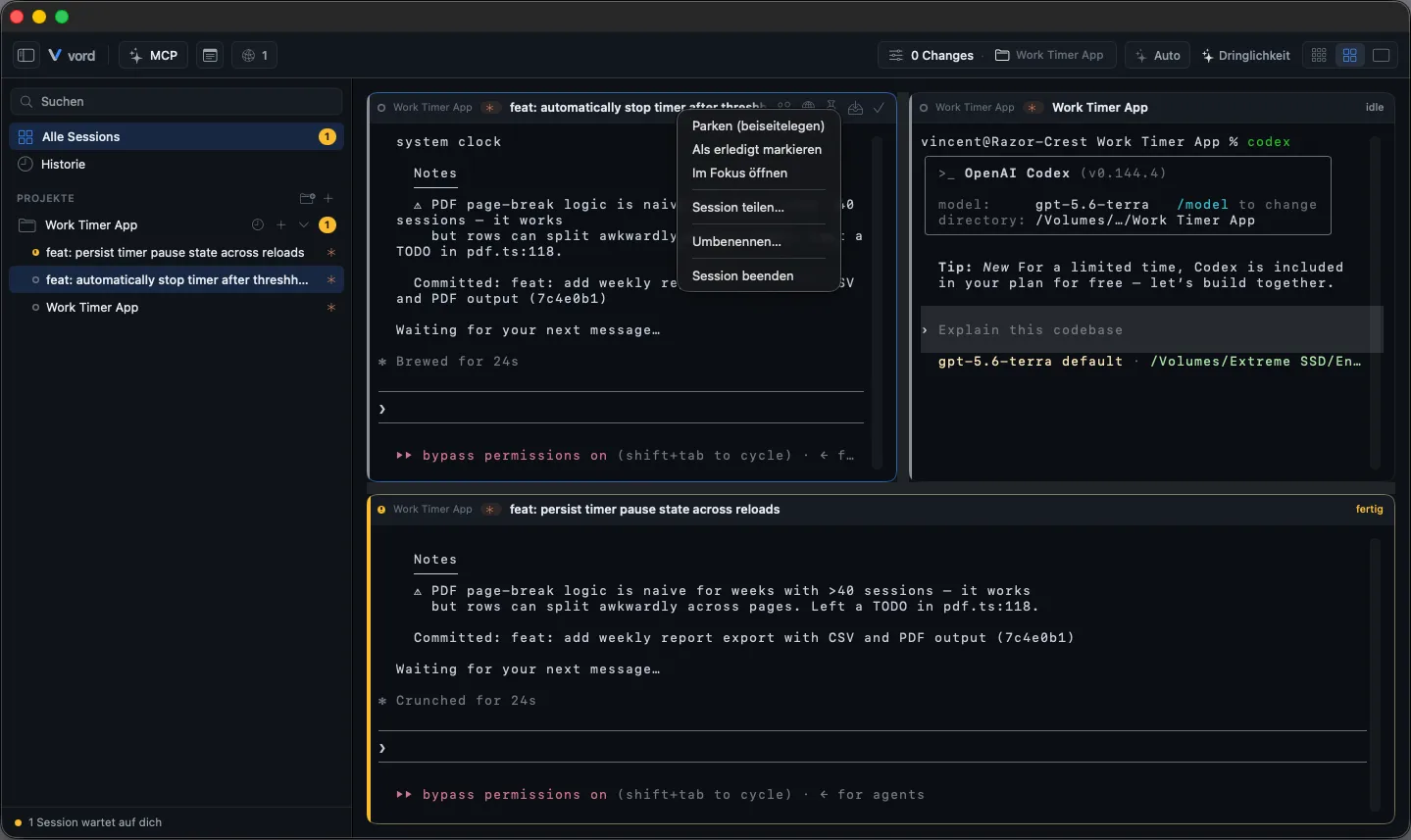
Pin, Park & Mark Done
A session doesn’t just sit in the cockpit grid until it dies. You can pin it so it never gets bumped, park it to clear space without touching the running process, or mark it done to end the process while keeping the conversation recoverable. Each does something different — mixing them up costs you either a stuck slot or a killed process you didn’t mean to kill.
Pin: keep a session fixed in a slot
Section titled “Pin: keep a session fixed in a slot”Pinning turns a tile into a fixed point. The grid normally reorders its tiles by sort axis as urgency and activity change, but a pinned tile stays in its slot regardless of how urgent other sessions get.
- Hover over a tile’s header to reveal its action icons.
- Click the pin icon (tooltip: “Pin to this slot”).
- The tile stays put; a small filled pin icon marks it as pinned even when you’re not hovering, so you always know why it isn’t moving.
- Click the pin icon again (“Unpin”) to release it back into normal sorting.
Pinning a session that’s currently in the on-demand pool (not visible in a slot) pulls it into a slot immediately.
vord never pins a tile on its own. A pin only comes from the pin icon or the right-click menu. Opening a session while the grid is full uses the overflow slot instead, so the rest of the grid keeps following the sort axis.
In manual reorder mode (Auto toggle off), a pinned tile also can’t be dragged — it’s a fixed point there too, not just in auto-fill.
Park: hide it, nothing stops
Section titled “Park: hide it, nothing stops”Parking removes a tile from the working cockpit without touching the process behind it. The terminal, the coding agent, and status detection all keep running exactly as before — parking is a pure visibility toggle, not a pause.
- Hover a tile and click the park icon (tooltip: “Park (set aside)”), or right-click a tile and choose Park (set aside).
- The tile disappears from the active cockpit grid.
- Click the park toggle in the toolbar, or turn on Only parked in the Cockpit menu, to see only parked sessions (the toggle always shows the parked count and is disabled until at least one session is parked) — useful for working through them one at a time instead of having them compete with everything else for a slot.
- Bring one back with Bring back to cockpit (hover icon or context menu) — or from inside the park filter view.
The park filter and the share filter are mutually exclusive — you can have at most one of them isolating the grid at a time.
Mark done: end the process, but keep it recoverable
Section titled “Mark done: end the process, but keep it recoverable”Marking a session done is the one action here that actually stops something: it ends the process cleanly and hides the session from every active view (cockpit, sidebar, gallery). Unlike parking, an agent marked done is not quietly working in the background anymore — “out of sight” also means “out of CPU and token usage.”
- Hover a tile and click the checkmark icon (tooltip: “Mark as done”), or right-click a tile and choose Mark as done.
- The tile disappears from cockpit, sidebar, and gallery.
- Toggle Show completed sessions in the sidebar (or search) to find it again.
- Click Bring back in its context menu — this un-hides the session but does not restart the process. To actually resume the conversation, use Resume (see History & Resume).
A pin on a session is dropped automatically the moment you mark it done — a fixed slot makes no sense for a session that’s no longer live. If you actually want a fresh conversation instead of continuing the old one, don’t resume — start a new session in the project instead (see Starting Sessions).
If the session was shared with another vord user, marking it done (or closing it) also ends that share automatically — the guest is disconnected right away instead of watching a dead session. You don’t have to stop the share by hand first.
Background processes the agent left behind
Section titled “Background processes the agent left behind”When an agent session ends — you mark it done, close it, or the agent quits by itself — vord also ends the background processes the agent started, even if they detached themselves from the agent (for example a dev server started with nohup … &). Shell tiles are excluded, and so are SSH sessions: processes you start there keep running as before. Background processes are also stopped when they detach into their own sessions; processes that cannot be reliably attributed remain running.
vord finds these processes by the terminal session the agent ran in and by a marker (VORD_SWEEP_MARKER) that vord generates anew every time it starts the agent and that every process of that run carries in its environment. A restarted or resumed tile therefore never loses its new agent to the cleanup of the old one. It only looks at your own processes, never at vord itself or the programs inside the vord app, and never at anything that belongs to another session. Each hit first gets a polite stop request (SIGTERM); anything still running after 10 seconds is force-quit (SIGKILL). Every process it ends is written to the event log with its process ID, the program name (not the command line, which can contain secrets), the signal, and the first eight characters of the marker. These entries are written even when the events log is switched off.
Families: pin and park act on the whole family
Section titled “Families: pin and park act on the whole family”A parent and its children share one cockpit grid place (Child sessions) — whether they fold into a single card (Folded, the default) or spread across neighbouring cards inside one frame (Grouped). That changes what these three buttons reach:
- Pin belongs to the grid place, so it pins the whole family. There is no way to pin one child away from its parent.
- Park and Bring back always apply to the whole family, no matter where you trigger them — the parent’s card, a child’s card, the tile button in the Team view, a sidebar row, a pool chip, a gallery card, or the right-click menu of a child — and the label then says “Park family”. Parking only one member would leave the rest behind as separate tiles, so there is no single-member park. The family here is every living member, including children you parked earlier.
- Mark done follows what the card or row is showing: on the parent’s card it acts on the whole family (“Mark family as done”), on a child’s card on that child alone. Only the sidebar row and the pool chip still address a single session for Mark done, because that is what they show. Marking a parent done from the sidebar (that row addresses one session) drops its children back to tiles of their own, flagged ↳ detached.
Which to use when
Section titled “Which to use when”| Pin | Park | Mark done | |
|---|---|---|---|
| Process | keeps running | keeps running | ends |
| Stays visible in cockpit | yes, fixed | no | no |
| Reversible | yes (unpin, instant) | yes (unpark, instant) | yes (bring back / resume, but process restarts) |
| Use it when | this session matters most right now and must not get bumped | you want it out of the way but it still needs to run unattended | you’re actually finished with it, at least for now |
| Persisted across restart | no | no | yes (lifecycle state) |
Bringing them back
Section titled “Bringing them back”- Unpin — click the pin icon again. Instant, no process impact either way.
- Unpark — click “Bring back to cockpit” (hover icon or context menu, also available from inside the park filter). Instant; the session was never paused.
- Bring back (from marked-done) — un-hides the session in cockpit/sidebar/gallery, but the underlying process is gone. Use Resume to actually restart it with the same conversation continued (see History & Resume for how vord picks the right conversation to continue, including the disambiguation sheet when more than one match exists).